Category: driving seat | 產品試用 | 시험 비행 | 製品トライアル

The driving seat in English has two definitions:

  1. The seat from which a vehicle is operated.
  2. A position of power, dominance, control, or superiority. The second naturally is derived from the first as a metaphor
I used driving seat as a metaphor about being in control, to discuss what a product is like to use. I looked at a range of products:
  • Skype back in 2004, before it became kludgey with a poorly designed interface under Microsoft ownership
  • Veoh – a video platform that was a native client and on the web that went head-to-head with YouTube. The better technology lost out
  • Yojimbo – a great information organisation software app by Bare Bones Software
  • Flip Video Camera – back before cameraphones were ubquitous flip provided an easy way to record and upload video to the web. It encouraged a lot of people to record vox pop video interviews for the nascent YouTube platform
  • The Bing search engine in a direct comparison to Ask.com
  • Sina Weibo
  • A retrospective on the Palm Vx PDA that was my dot.com era ride or die gadget
  • Early Casio G-Shock and Apple Watch smartwatches
  • Hemingway writing software
  • Casio G-Shock Frogman
  • A retrospective review of the Nokia n950
  • The Missing Manual series by David Pogue
  • Apple iPhone 12 Max

I have tried to avoid superlatives and give the perceptions of having lived with the products rather than having briefly tested them. Having run review programmes for Huawei and Palm, I understand how short hands-on sessions can be deceptive. Usually this isn’t by design, but due to supply issues; however it is worth bearing in mind when you read the latest review by professional pundits.

  • Nokia N950

    Nokia N950 origins

    The Nokia N950 was designed at a weird time. Nokia’s position as the premier smartphone maker was under siege from Android and iPhone after seeing off the Palm OS and numerous iterations of Windows Phone. Nokia had missed the boat on devices with capacitive touch displays. It was using a smartphone operating system that was starting to show its age, a bit like PalmOS did previously. Like Palm, Nokia wasted far too much time coming up with its next generation OS, which gave Google and Apple the opportunity gap that they needed.

    Part of the problem was that Nokia was wrong for the right reasons:

    • Different consumers do need different types of phones, which is why HMD have managed to resurrect modern versions of classic Nokia feature phone designs
    • Phones are better if they can be operated one-handed. Whereas Google and Apple busied themselves designing computers that happened to be phones
    • Phones needed to be made down to a cost. So the handsets were different on the outside but had common ‘guts’, which meant that premium products could  be underpowered

    Nokia had their own answer to Android and iOS in MeeGo which grew out of work that Intel and Nokia had separately done on mobile Linux. Nokia was partnering with Intel partly because it believed that Intel was the future of mobile.

    The Nokia N950 was a development handset showcasing this operating system in action. It was similar and related to the N9.

    The N9 was released in a limited amount of markets were it was successful. However the N9 success story was overshadowed by the larger business problems Nokia faced in its transition from Symbian and feature phones to Windows Phone.

    There were an estimated 5,000 Nokia N950 handsets made in total, which went to the Nokia global developer community. Technically there are loaned devices rather than given to developers. They occasionally appear on eBay going for 1,000GBP+

    Up close with the Nokia N950

    At first glance the Nokia N950 looked like a chimera of the N9 and the N8 with a slide out keyboard riffing on the Communicator form factor that Nokia pioneered.

    It makes sense to list the differences with the N9 first of all:

    • The Nokia N950 had a TFT LCD screen roughly the same size as a Nokia E90 Communicator, but with a higher resolution. The N9 had an AMOLED screen which is slightly smaller and has a slightly higher resolution
    • The N9 was made from the same machined polycarbonate body that then made its appearance on Nokia Lumia models. The Nokia N950 has a case made from a mix of machined and stamped aluminium parts and came only in black (though I have seen pictures of un-anodised devices as well. These were probably pre-production prototypes)
    • They had different camera modules that performed broadly the same
    • The Nokia N950 had a pop under keyboard similar to  the N8 and E7. More on that a bit later on
    • The Nokia N950 had 8.5GB of usable storage compared to up to 64GB of memory in the N9
    • The N9 has a slightly larger battery than the N950, but the difference wouldn’t have been noticeable due to the difference in screen technology

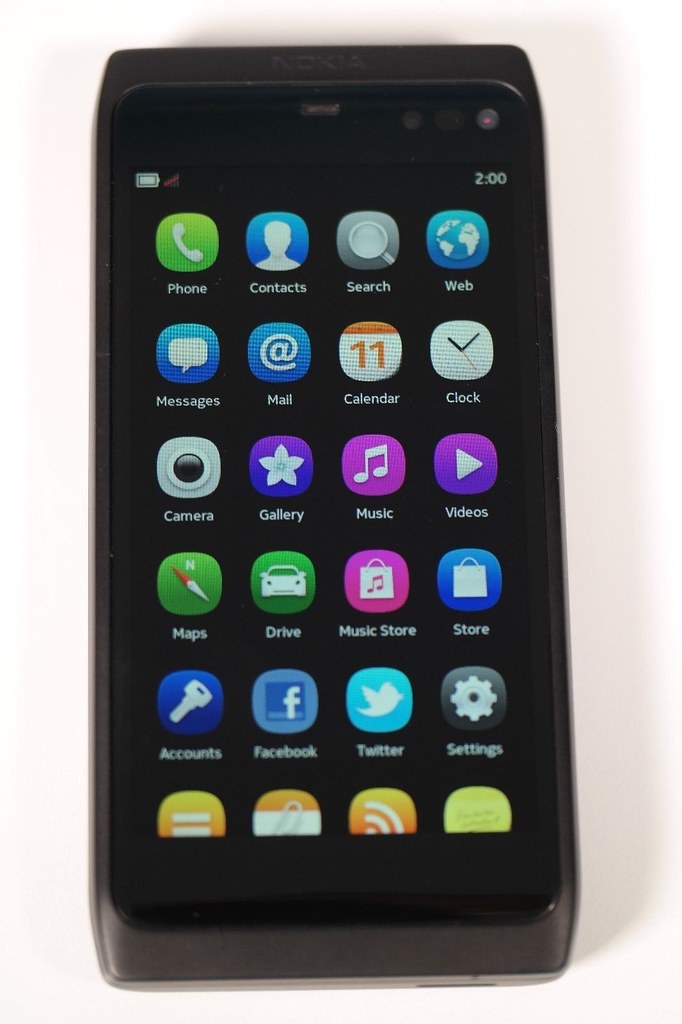
    What you end up with is a phone that still looks modern (partly due to its anodised black case making the screen edge harder to spot.

    Nokia N950

    The device is slow compared to modern devices but is speedy for its time. The device flipped from landscape to portrait mode, but this wasn’t perfectly implemented.

    Nokia N950

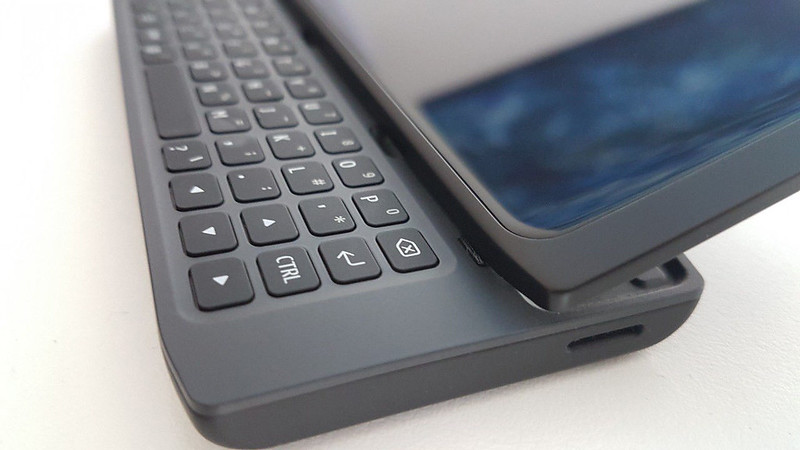
    It had a pop under keyboard which allows the device to have a really shallow design in comparison to Communicator devices. However it does leave the screen exposed to damage. The past decade of Gorilla Glass™ screens on iPhones and Android handsets proves that the Corning wonder material is not invulnerable.

    Nokia N950

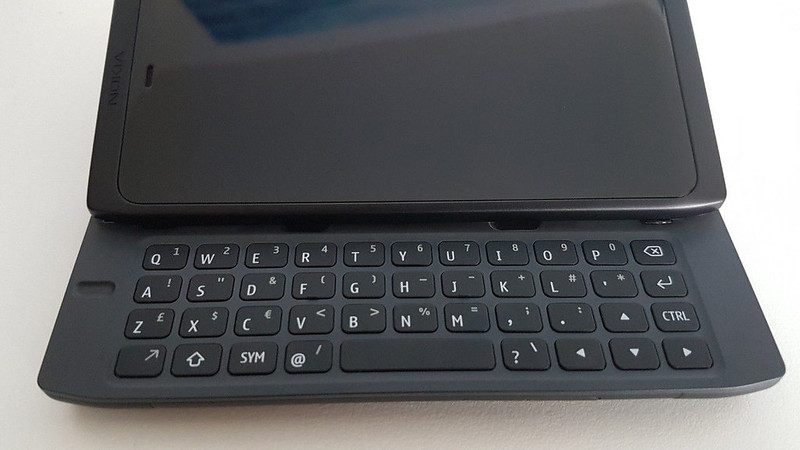
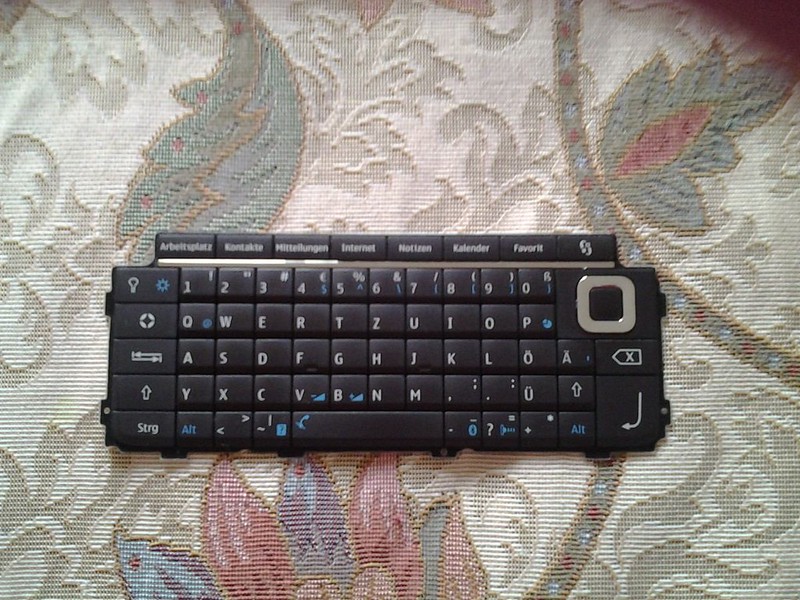
    The problem with the design means that you end up with a shallow area for the keyboard. The Nokia N950 like the E7 and N8 don’t have as full a featured keyboard as the Communicator devices.

    10 - E90 keyboard

    Here’s a keyboard from the E90 by comparison. When you were using the Nokia N950 you end up with a virtual keyboard on the screen  providing the tab,  ctrl, esc and alt keys, as well as very commonly used symbols.  Which begs the question of how useful the keyboard would really be for developers?

    Compared to the modern iPhone, the N950 meets the goal of a mobile computing device much better. You can write longer emails and documents on the keyboard than the iPhone. The camera is adequate for most people’s needs and it shows in some respects how little the smartphone concept has moved on over the past seven years.

    Could the Nokia N950 been the future?

    Historically Nokia’s Symbian phones had been built on TI’s OMAP processors; but these didn’t have a roadmap for 4G wireless. Nokia had two choices bet on Qualcomm or Intel. Qualcomm had come out on top in IP related disputes, which probably made Intel seem more attractive. Intel was also championing WiMax as a 4G standard.

    WiMax had limited adoption at best, Nokia was on the wrong side of networking standards and eventually was forced to use Qualcomm processors in Windows Phone reference designs.

    `Nokia could have gone to Snapdragon processors but its joint relationship with Intel on the software side of things would have been tainted. There is also no guarantee that Qualcomm would have been a helpful partner given the history between the two companies and that both Android and iOS devices used Qualcomm products.

    Secondly, Nokia bet all the marketing budget on the Lumia device launch which left nothing for the MeeGo devices.

    Finally, Nokia would not have been able to get out of the legal contract that they had with Microsoft. The only way MeeGo would have stood a chance is if the Nokia board had not approved Stephen Elop’s proposal to go with Windows, rival schemes to go with Android and bet on the home team.

    • At the time the internal Nokia option would have looked high risk. Board members would have been familiar with historic project problems on Meamo and then MeeGo
    • Secondly Nokia had a history of buying in new generation operating systems. It licensed GEOS  for the Nokia Communicator 9000 and 9110. It licensed and then bought into Psion’s OS business unit, which became Symbian
    • Nokia’s feature phones ran on homegrown technology built on Intelligent System Architecture (ISA), also called the Nokia Operating System (NOS)
    More information

    TIMELINE: Qualcomm vs Nokia patents battle | Reuters
    Qualcomm loses GSM patent fight with Nokia in German court | Ars Technica
    Why Qualcomm Folded to Nokia | Bloomberg BusinessWeek (paywall)
    The ‘I Wish I Had Known This’ List about 101 Things Wrong With Windows Phone Smartphones Like Nokia Lumia | Communities Dominate Brands
    How Many Lumia Sales? As Nokia (and Microsoft) ashamed to reveal number, lets count – and compare to N9 MeeGo sales | Communities Dominate Brands
    Nokia N8 review | GSMArena

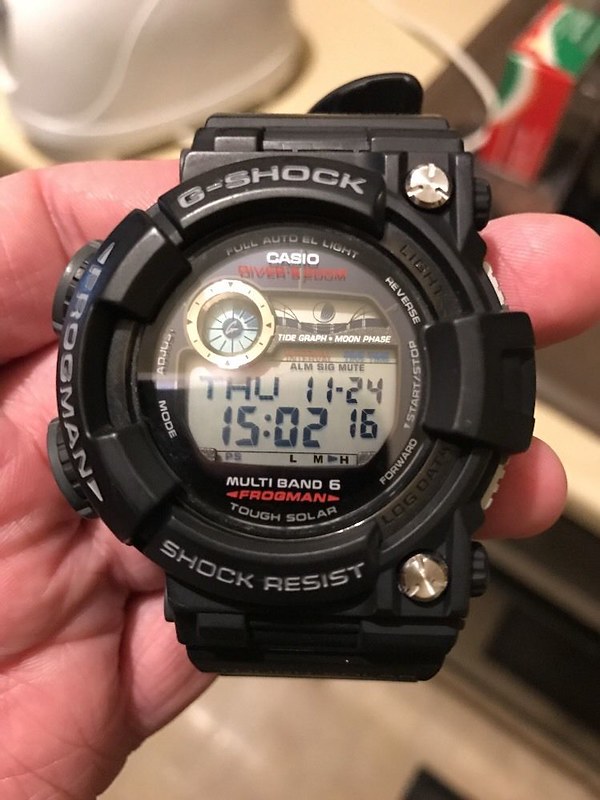
  • Living with the Casio G-Shock GWF-D1000 Frogman

    UPDATE – Casio G-Shock GWF-D1000 sudden stopped working and took on water  when I washed some curtains in a basin. Which is a bit much for such an expensive model that is well-known for its reputed toughness and 200M water resistance. Certainly not what you expect from a watch brand known for its toughness and having a current street price of £800. You can see the water inside the glass on the watch face and no apparent point of ingress. It’s not that long out of warranty as well. Casio have replaced it as it was just within warranty; but think carefully before purchasing one. 

    Casio G-Shock Frogman GWF-D1000 defeated by hand washing clothes in a basin. Redefines toughness and 200M water resistance. Just out of warranty

    When you typically look at reviews of products, there are usually reviewed over a short time when they are new-and-shiny. Often a products features and character come out over time – a symbiotic process between product and user.

    I picked up a Casio G-Shock GWF-D1000 soon after it went on sale for considerably less than the £800 that it is the current street price. Up until I bought the Casio G-Shock GWF-D1000; I had owned its predecessor the GWF-1000 (which I will call the 1000 from here on in).

    So what is the GWF-D1000 anyway?

    The Casio G-Shock GWF-D1000 is the latest in an a series of G-Shock watches aimed at scuba divers. The first Frogman came out in 1993. The overall design has largely been the same with an asymmetric case and a large display to make operation easier. The positioning of the watches and price points changed over time – some of the previous models had titanium cases and came under the Mr-G sub-brand. The last few models have a stainless steel core case with a DLC (diamond like coating) to protect the surface.

    Over time it has picked up features as the technology improved. It became illuminated by a small green bulb, then electro-luminescent material. It moved from relying purely on battery power to having solar cells and a rechargeable battery. The watch became more accurate by picking up time signals via radio from six locations around the world that are calibrated with an atomic clock (precursors to the NTP services around the world that keep your computer and smartphone bang on time.)

    The key technology gains over the 1000 include:

    • A dive computer rather than a dive timer (neither matter to me), it has the same basic functionality that dive computers used to have 20 years ago (minus PC connectivity). No big shakes until you remember that it is doing this all from a solar-powered rechargeable watch battery
    • Digital compass which is surprisingly handy, it is very forgiving of the way you hold it, expect this in other Casio watches soon.
    • Temperature reading (again more for the diver) or when you are running a bath
    • The display has been rearranged and a bit easier to read
    • Much better display light and crisper to read at night

    The real benefits for me were in the build quality:

    • You get a sapphire crystal rather than the usual hardened mineral glass. This isn’t the first time that Casio has used a sapphire crystal on a watch, but they are harder to manufacture and more expensive than the usual mineral glass face
    • The manner in which the strap is secured to the case has been completely revised. There is are new Allen key screws and a carbon fibre rod to secure the strap to the case
    • The strap is made of polyurethane resin reinforced with carbon fibre. The loop that holds the excess strap length is now a section of stainless steel which has been bent around the strap

    How do I use it?

    It makes sense to tell a little bit around why I wear a Frogman. I want an accurate watch (who doesn’t?). I want a reliable watch (again, probably a hygiene factor for most people; but one that hints at why the G-Shock has replaced Rolex as the default watch I have seen on Hong Kongers over the past 10 years or so. G-Shock offers robustness that 20 years ago would have come from fine Swiss engineering – at a much lower price point.

    I love my Swiss dive watches but there is a time and place for everything.  The knockabout case and its water resistance means that you can forget about the watch. You don’t have to coddle it or worry that it will pick up undue attention. You don’t have to worry if you get a bang on an elevator (lift) door, dropped on the bathroom floor or going for a swim.

    The G-Shock is an everyman watch – unless its got a lurid colour scheme it isn’t likely to attract the attention of your average petty criminal. I’ve often taken it off in the office so that I can type in greater comfort and left it there by accident when going home. I’ve never had a G-Shock go missing.

    It is relatively easy to use, despite the modal nature of its interface design. To change settings, use functions or see recorded information you have to cycle through a series of text menus – it has more in common with a 1980s vintage video cassette recorder or a DEC VAX. Quite how this goes down with consumers more used to iPads and SnapChat is interesting. Casio seems to do alright by attracting them with bright plastic cases reminiscent of Lego -based colour schemes.

    I haven’t dived seriously in a long time, I took up scuba diving while working in the oil industry and have never got back into it since moving to London.  PADI diving at resorts is tame compared to British diving club scene I had been used to.

    My work environment is creative which means that my uniform of t-shirts, flannel shirts,  jeans and suede hiking boots make the G-Shock an ideal accessory. I work in the London office of an American digital marketing agency, owned by a French multinational and my clients are scattered in the different offices around the world of pharmaceutical companies. The functions I tend to use most are the world time, date/time and the night light. My iPhone is now my alarm clock.

    The reality is that most of these watches will end up on the wrists of people like me rather than people who dive for a living.

    What’s it like to live to live with the D1000

    The Casio G-Shock GWF-D1000 is only incrementally heavier than the 1000, it felt a bit strange to wear for about 30 minutes after swapping over to the newer model. But in some ways the Casio G-ShockGWF-D1000 doesn’t yet feel like its my watch.

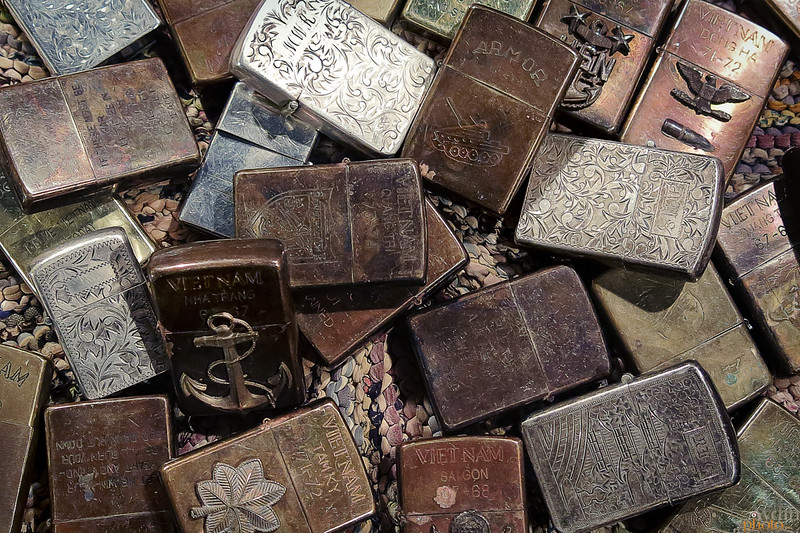
    The 1000 strap became shiny in places over time and more pliable, it felt like it became adjusted to me. Give the Casio G-Shock GWF-D1000 a rub over and it still looks box fresh. The downside is that the strap feels stiff and I still feel its edges on occasion – this isn’t about discomfort, but about the watch not feeling like part of you. There are no shiny parts of wear – it feels less like a ‘personal item”. It lacks what a designer friend calls authenticity; unlike distressed jeans, customised flight jackets or combat Zippos.

    Zippo Lighters

    This sounds great for the resale value, but I feel that it provides a worse experience for the wearer of the watch.

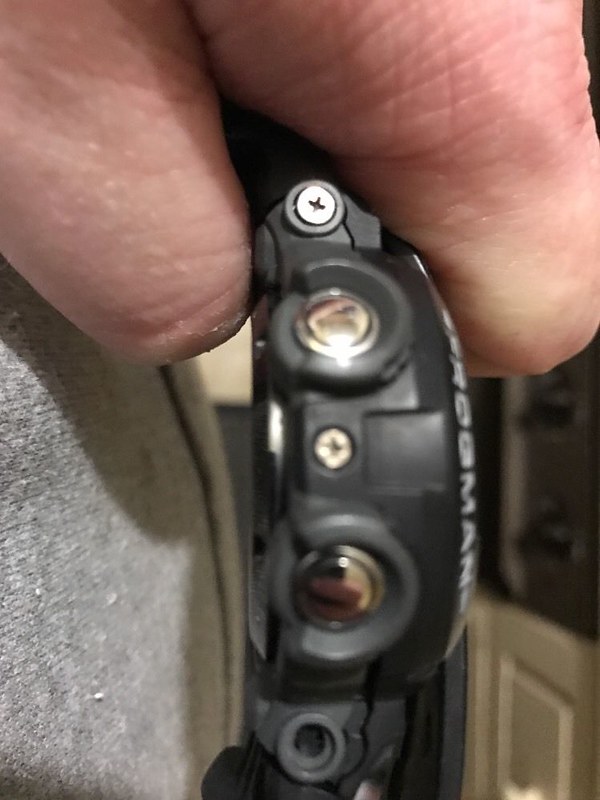
    The reinforced strap does have one bonus, it holds securely to the case. Look at these pictures of my two year old 1000

    Casio GWF 1000 Frogman

    You can see how the retaining screw that held the strap to the case came undone and disappeared over time. You don’t have these kind of problems with the Casio G-Shock GWF-D1000.

    The screen on the Casio G-Shock GWF-D1000 uses its real estate in a different way to the 1000.

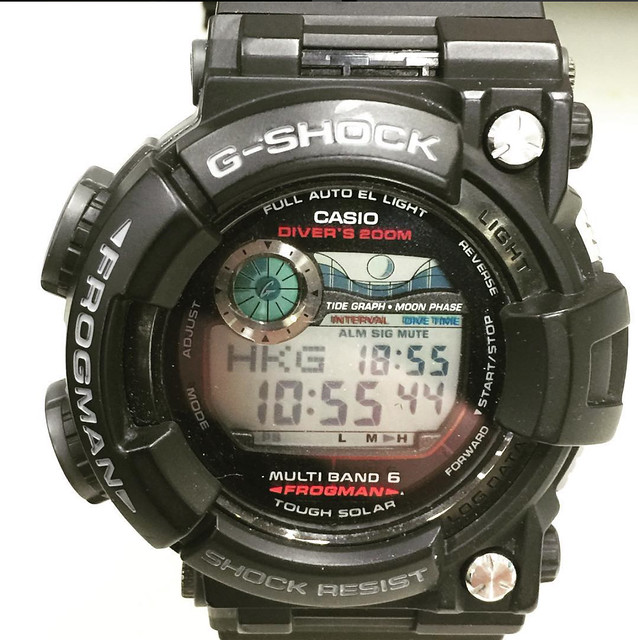
    Here is the 1000

    Casio GWF 1000 Frogman

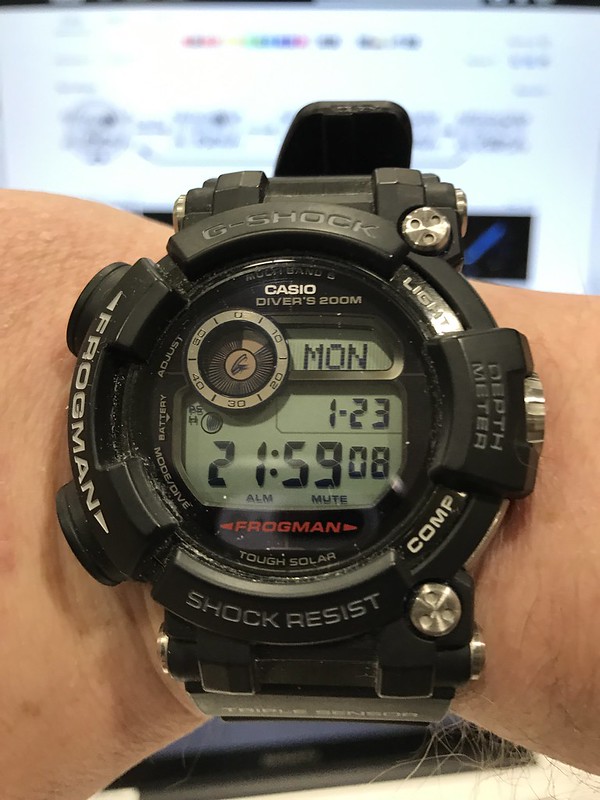
    Here is the Casio G-Shock GWF-D1000

    Casio GWF D1000 Frogman

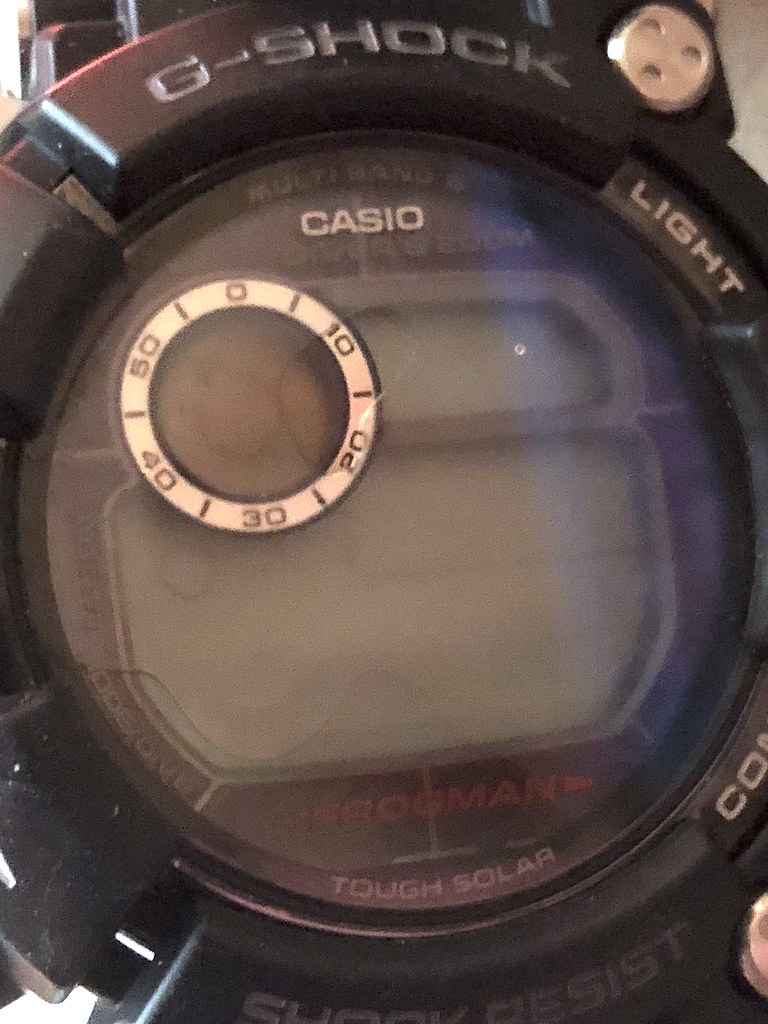
    At first the differences aren’t obvious. If you look at the top right side of the screen, the tide and moon segments are replaced by a multi-use screen on the Casio G-Shock GWF-D1000. The small icons for alarms and hourly alerts are moved to the bottom and left of the screen on the Casio G-Shock GWF-D1000, the moon icon now moves to the left of the main screen down from the top right. This probably marginally increases the screen real estate and helps make legibility a bit clearer at night.

    GWF 1000

    The biggest 1000 feature that I miss is the ability to toggle with one press of the top left button from showing the date on the screen to showing a second time zone; it was extremely handy for work. And having come from the 1000 to the Casio GWF-D1000 it was a real ‘what the fuck’ moment.

    By comparison I have to press six times to get to the world time screen. Instead, it now toggles between a tide table and the day. Even giving it a two press option would be a better fix than what the Casio GWF-D1000 currently has. It’s a small gripe, but it annoyed the heck out of me.

    My work around has been to keep the watch in world time mode and if I need to know the day or date, I find myself reaching for my iPhone.

    If you are really that worried about tide tables, you will be likely using a specialist service as they vary a good deal over relatively short distances.

    If the Casio G-Shock GWF-D1000 still sounds like the kind of watch you want, you can get it here.

    SaveSave

    SaveSave

    SaveSave

    SaveSave

  • The helmsman + more things

    Sailing the Seas Depends on The Helmsman

    Sailing The Seas Depends On The Helmsman – There has been a minor drama playing out amongst westerners who analyse China. A theatre group put on a performance in the symbolic heart of the Chinese Communist Party. Sailing The Seas Depends On The Helmsman – is a Cultural Revolution era song which eulogises Mao Zedong’s leadership.

    The Helmsman or Great Helmsman was one of the many labels Mao picked up as leader of China.  This series of concerts were seen as a celebration of the Cultural Revolution and elevated President Xi to a similar ‘cult of personality’ within China. Some considered it to be a subtle way to sabotage Mr Xi. Either way it took pull to allow the group to perform in the Great Hall of the People. The scale of the presentation was spectacular and it’s quite a catchy tune – as you can see in the video created by the South China Morning Post.

    Morgan special projects

    I am not the fan of car designs that I was as a child and have never been a fan of Morgans. But there is a lot to admire in Morgan Motor’s Special Project team. The video outlines the process they went through in building a bespoke car for a customer.  Ask pretty much any other car manufacturer to do this and the money would literally be astronomical.

    It is ironic in a day of 3D printing and CNC machines that they use old school techniques that my Dad would have learned as an apprentice to create a special one-off car. There is also an interesting mix of materials in the design and the marine plywood-based seats caught my eye.  The designer gave careful thought to how the car would age.

    Objective See

    Objective-See – handy ransomware blocker for OSX (macOS), ideal for these troubled times when 2/3rds of UK business have come under some form of a hack.

    Everyday objects

    A blogger who goes by the name of ‘The Electronic Mercenary’ has set up a great YouTube channel where they x-ray everyday objects or components for your enjoyment.

    Check it out.

    I don’t often have much time for Samsung, their product advertising usually lacks subtlety and creative chops – you are not charmed by their marketing. Instead you are bludgeoned into submission with a media plan that has more in common with a Katyusha rocket system than persuasion. Occasionally they do some stunning emotive corporate marketing, this is the latest example. Separated Korean families unite in heartfelt Samsung spot | Marketing Interactive

  • Using terminal.app in macOS

    Terminal.app is a way of getting to the Unix underpinnings of Apple’s Mac OS X operating system. It is generally kept out of the way because an uneducated user could do a lot of damage. I have put together eight of my favourite life hacks using Terminal here. Your mileage will vary. Over time Apple has stopped supporting some commands and introduced others grep used to come in handy for finding and removing duplicate files.  A new command called ditto makes it really easy to make copies of folders.
    Check the weather

    Finger was originally used on Unix systems as a kind of directory system. You could see a person’s office address, their telephone number and the last time that they had logged on to mail (what we’d call email now). That last bit of data gave you an idea of if they were available online at the moment.
    Ping a website

    If there is one terminal.app function everyone should know, it would be how to ping as a basic way to check their net connection. Just be sure to switch your pings off once you know!
    Find the address of every device on your network

    This is very useful if you are trying to stop your neighbour piggybacking off your Wi-Fi connection.
    Get details about a domain name

    Usually I’d be going to a site like whois.com to get this information. But in terminal.app you get the most comprehensive data and don’t have to put up with adverts.
    Change the screenshot format
    Show hidden files in Finder
    Show path view in Finder
    Strip out unnecessary system animations
    I have put together each of these as a presentation as well. More on productivity and MacOS here. It is worthwhile also checking out ‘Learn Enough Unix for Your Resume‘ on Wired. Pamela Statz’ article originally featured on Wired’s ‘hotwired.com’ site during the dot.com boom in 1997. It was then moved on to their now redundant Web Monkey brand and now resides on Wired. Yet like Unix the article still remains useful :-). Also check out Jeffrey Paul’s Stupid Unix Tricks here, the Unix Toolbox is also good, but think carefully about what you’re doing before you do it. Interesting background reading on BSD (a real Unix) versus Linux (a Unix-like system). It also worthwhile checking out David Pogue’s books on macOS and O’Reilly Publishing’s books on Unix.

  • Hemingway + process

    I use a range of tools including Hemingway as part of my content creation process. This came out when I had a meeting with some junior marketing agency staff last week. The purpose of the meeting was to discuss content strategy across different clients. In the end an good part of the conversation went into process and content creation.

    Given that conversation I thought it might be fruitful to flag up some of the technologies that I use.

    Hemingway

    I use Hemingway ( a web application and a native OSX application) to write. Hemingway has two writing modes:
    Hemingway - editing mode
    Editing mode looks at your copy as you create it:

    • It looks at readability providing a reading age score. (Grade six is equates to 11-12 years old). The lower the reading age, the clearer the writing is. It has also aids in SEO
    • It examines sentence structure, the harder a sentence is to read, the more ambiguous it may be.
    • Hemingway suggests simpler alternatives to phases
    • It looks at adverbs and use of the passive voice

    Hemingway is like having a sub-editor sitting on your shoulder at the point of creation.
    Hemingway - writing mode
    Writing mode clears the real-time editing functions to the right of the screen. It allows me to get content down as a stream of consciousness. It allows me to get ideas down before I lose the train of thought.

    You can then switch to editing mode to go back and clean up your copy once you have it down.

    The OSX version allows you to save documents down as a HTML file, from which you can cut and paste into a destination. It just works whether its a presentation, document, WordPress or social platforms.

    Pinboard

    Pinboard is a social bookmarking service that now costs $11/year. It allows me to store links and notes about websites that I find of interest.
    Pinboard - home screen
    Pinboard is a web service so my bookmarks go where I can get a web connection.
    Pinboard - bookmark screen
    I use a bookmarklet that sits in the chrome of my browser. Every time I come across something that might be of interest, I click on the link and complete a simple form.

    • URL – I only change the link if it is a temporary link such as ‘feedproxy.google.com’. I expand the link or change it to any permalink that is on the page
    • Title – I edit this as necessary to reflect the article title and the website name
    • Description – this is a quick explanation of why I thought the page was significant. It might be an article quote or top statistics mentioned
    • Tags – categories or labels that I assign to an article which allows me to find it based on a relevance. Tags are used by other applications as well

    I use Pinner for iOS on my iPhone. It integrates into the system level sharing functionality. I can create bookmarks on the move as well as at my desk.

    Terminal

    The Terminal app in OSX allows direct access to the power of the operating system. It is also unforgiving. Getting a command wrong can have serious consequences.
    Terminal app - introduction
    There are a few things that I can do faster in terminal than via other methods. From checking  differences in documents, to batch processing file archiving. To get you started here are two examples that you can try: to see if a website is up to getting a weather forecast.
    Terminal app - check the weather forecast
    Terminal app - ping a website
    I have a copy of UNIX in a Nutshell from O’Reilly Media on my bookshelf. I use this as a back-up when I can’t remember the proper  syntax or a command. I can also recommend Learning Unix for OS X: Going Deep With the Terminal and Shell also from O’Reilly Media.

    IFTTT

    At the beginning of 2007 Yahoo! launched an experimental product called Yahoo! Pipes. It was flakey, it was unreliable but also revolutionary. Pipes was an easy way to stitch together services without programming expertise. After years of flakey service it was shutdown by Yahoo! in June 2015.
    IFTTT
    Pipes inspired another service IFTTT. IFTTT stands for ‘If then, then that’. It is a simple cause and effect framework that allows for the automation of actions over the web. These cause and effect formulas called recipes. It supports a range of web services and apps. Most of the discussion around this for Intenet of Things automation. I use it to automate my web content content.

    More in part two.

    I pulled part one together in a companion presentation.

    More related content can be found here.

    More information

    Hemingway OSX application

    Pinboard

    Pinner app for iOS

    IFTTT – (If Then, Then That)

    Books

    Learning Unix for OS X: Going Deep With the Terminal and Shell by Dave Taylor

    UNIX in a Nutshell by Arnold Robbins