Category: driving seat | 產品試用 | 시험 비행 | 製品トライアル

The driving seat in English has two definitions:

  1. The seat from which a vehicle is operated.
  2. A position of power, dominance, control, or superiority. The second naturally is derived from the first as a metaphor
I used driving seat as a metaphor about being in control, to discuss what a product is like to use. I looked at a range of products:
  • Skype back in 2004, before it became kludgey with a poorly designed interface under Microsoft ownership
  • Veoh – a video platform that was a native client and on the web that went head-to-head with YouTube. The better technology lost out
  • Yojimbo – a great information organisation software app by Bare Bones Software
  • Flip Video Camera – back before cameraphones were ubquitous flip provided an easy way to record and upload video to the web. It encouraged a lot of people to record vox pop video interviews for the nascent YouTube platform
  • The Bing search engine in a direct comparison to Ask.com
  • Sina Weibo
  • A retrospective on the Palm Vx PDA that was my dot.com era ride or die gadget
  • Early Casio G-Shock and Apple Watch smartwatches
  • Hemingway writing software
  • Casio G-Shock Frogman
  • A retrospective review of the Nokia n950
  • The Missing Manual series by David Pogue
  • Apple iPhone 12 Max

I have tried to avoid superlatives and give the perceptions of having lived with the products rather than having briefly tested them. Having run review programmes for Huawei and Palm, I understand how short hands-on sessions can be deceptive. Usually this isn’t by design, but due to supply issues; however it is worth bearing in mind when you read the latest review by professional pundits.

  • Opel Corsa

    I haven’t been a car owner since 1998. Back then driving a car was a very analogue experience and had been for decades. I grew up reading Car Magazine and was excited to get behind the wheel and drive when I was old enough. The reality of driving was rather underwhelming. The Opel Corsa was also known as the Vauxhall Nova at the time, now it’s also known as the Vauxhall Corsa. The Opel Corsa of the time was known as a good first car for new drivers. This was back when joyriding was a crime wave sweeping the UK and Ireland and vehicles leasing or finance wasn’t as commonplace as it is now.

    Consequently insurance companies penalised car owners with punishing insurance premiums, to the point that my car usually cost less than the annual price to insure it. 

    Last car standing

    I owned or driven a number of the competitors to the original Opel Corsa including the Fiat Uno, the Ford Fiesta and the Rover Metro. Rover went bankrupt, Fiat now makes a retro-futurism of the Fiat 500 rather than a modernised version of the Fiat Uno and finally Ford sunset the Fiesta. So the Opel Corsa remains the last car standing. 

    Convoluted product DNA

    However, that belies the fact that GM Europe including their Vauxhall and Opel brands were sold to the PSA Group and then became part of Stellantis in 2021. Stellantis is the result of a merger between the PSA Group (Peugeot, Citröen, DS, Opel and Vauxhall) with Fiat Chrysler Automobiles (Abarth, Alfa Romeo, Chrysler, Dodge, Fiat, Jeep, Lancia, Maserati and Ram Trucks.

    This generation of the Corsa relied on PSA underpinnings rather than previous generations based on General Motors designs.

    Modern Opel Corsa versus its ancestors

    Opel Corsa-e

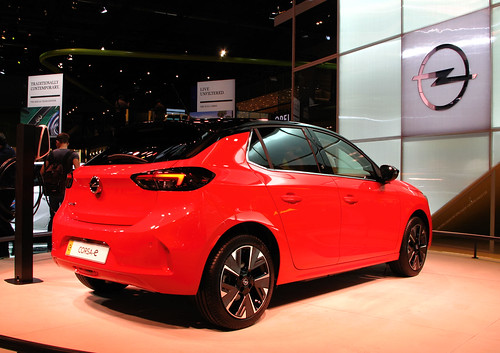
    The modern Opel Corsa has a wedge shape with more overhangs that gives it a pleasant look. In the driver’s seat is when the experience starts to change from the original car. The wedge shape and high doors with obligatory side impact protection means that you have significant blind spots in the drivers chair. 

    The original Corsa was a three door car, but four and five door versions came along later. The modern Opel Corsa allows a little more leg room in the back. The boot would hold two carry on cases and a couple of tote bags, which from memory was a little larger than the late 1990s capability of the Opel Corsa. 

    Back to the interior. As a super mini, the Opel Corsa’s seats were one of its better features. The modern car had seats that felt weirdly similar to previous generations of Corsa, even down to the lack of lumbar support and a manual knob to dial in the seat back angle. 

    Because of the smaller windows and higher doors the interior also felt darker, rather than the light airy driving experience that I remembered.

    Dashboard

    The most apparent change in the latest version of the Opel Corsa compared to its ancestors is the dashboard. Digital car systems go back to the likes of Clarion’s Auto PC from 1998. There is no voice recognition, but there is a touch screen. This controls some of the car’s settings such as having the lights come on automatically, the radio and mapping. The digital experience was limited compared to systems from the likes of Mercedes Benz, but that’s no bad thing, as there was less technology to master. This was particularly important given that it was a hire car, that I wanted to get into and drive away with minimum fuss.

    I found its reversing camera invaluable, mainly because of the narrow view provided by the the rear window.

    My car was rented from Hertz. While Opel claims that the car is compatible with Apple CarPlay, I couldn’t get it to work so both navigation and media options were limited. This meant that the car’s information screen was of limited use and a smartphone holder became a must purchase item in order to use a mapping app.

    On the plus side, what was there was intuitive to navigate, which is important to the hire car experience. Maybe the system was restricted at the request of Hertz? I don’t know.

    The button controls for lighting off the screen would be hard to reach for drivers with smaller arms.

    Driving

    The 1.2 litre engine is fine for either motorway driving or in urban conditions. At no point did I feel that I would have preferred more power, to paraphrase Rolls Royce the acceleration and speed were adequate. I managed to get about 50 miles / gallon out of the car through a mix of driving, which surprised me.

    The car was skittish, yet unengaging in terms of its handling, with a steering wheel that was oddly shaped for using during longer journeys. The clutch was very progressive, but the brakes weren’t.

    The Opel Corsa isn’t a desirable car, but it is a perfectly adequate one.

  • Living with the iPhone 12 Pro Max

    iPhone 12 Pro Max transition

    I moved to an Apple iPhone 12 Pro Max from an Apple iPhone 11 Pro Max. That’s an important  factor to bear in mind when one sees phone comparisons. Secondly, I don’t earn my living doing phone reviews, so my reactions are likely to be less dramatic than a professional phone reviewer. Instead, I am trying to reflect a view of what its like to live with the device. 

    Smartphones overall

    You would have to look pretty hard to find a dreadful premium or mid-range smartphone nowadays. Some of the lower end Motorolas are sluggish performers, have the build quality of an early Samsung Galaxy and a mic that cuts in and out. But for the average iPhone user, a phone that is five years old is still a cracking phone, that could go another few years with a replacement battery. 

    The cameras are more than adequate for snapshots or document scanning, but no amount of software will make up for the quality of the lens in a smartphone versus a semi-professional photographers camera. And for most people, that’s enough. Performance has reduced to incremental improvements in real world performance. And in this respect smartphones mirror personal computers; as the huge perceived performance gains of the early computers flattened out. 

    I no longer need a Mophie Juice Pack case to make the iPhone last through a work day like I did with the iPhone 3GS. Although for long trips away from my desk, I still a power pack and a cable in my bag. This is as much about having the reassurance of knowing that I can run down my battery with lots of Maps usage if I have to, rather than a real need. Increased battery life is partly a function of screen size. The larger the screen, the larger the battery. Device screen sizes have grown over the years. Secondly, chip design and system software have focused on power consumption as part of a decade plus long focus on computing power per watt. 

    I still miss the keyboard and form-factor of my old Nokia E90; despite its flaky Symbian software. But I no longer miss its superior battery life, or the ability to remove the battery and replace it with fully charged spare. 

    Out of the box

    All of the iPhone 12 models come in smaller packaging than previous devices. The primary reason for this is Apple no longer supplies a USB charger. The excuse that Apple provided was that it was environmentally friendly. The problem with this is there are some awfully unsafe USB chargers available online as an alternative. The second thing that was missing from the box was a set of Apple wired earbuds. Again this was put down to being environmentally friendly by Apple. Though you could also come to two less flattering conclusions:

    • Apple is converting an insignificant amount of Android users, but only converting existing Apple iPhone customers. So headphones with a Lightning connector wasn’t needed and Apple could save on costs
    • It was a cynical ploy by Apple to drive AirPod wireless headphone sales even higher

    I can understand why Chinese netizens considered both moves to Apple shortchanging customers. I agree with them.

    China

    It is also interesting to note that all the main live-streaming platforms in China simultaneously decided to cancel live-streaming of the iPhone 12 series launch.

    Of course the Chinese government / Communist Party of China had nothing to do in coordinating this – honest….

    Handset design

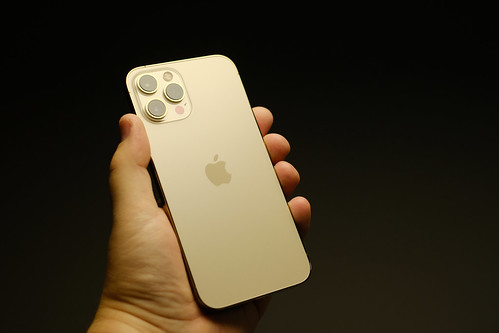
    When you take the iPhone 12 Pro Max handset out of the box, you immediately notice its size and weight.  It has steep stainless steel sides like an iPhone 4 on steroids. 

    Apple iPhone 12 Pro Max
    iPhone 12 Pro Max view from the back of the phone

    Usually the heft of a premium phone feels reassuring. But at first, holding the phone was a dissonant experience. There were a few reasons for this:

    The change in design language from smooth round edges on handsets from the iPhone 6 onwards, to a flat edge of the iPhone 4 and 5.

    It was the first time that an iPhone model has become thicker than the previous generation of iPhone.

    The change in design with its thicker flat sides has little difference in putting on a protective case, but removing the case is noticeably harder.

    After three days or so usage, the iPhone 12 felt perfectly normal as I got used to it.

    Camera

    As I said at the outset to this post, this like other modern premium smartphones, are good at taking snapshots. The main difference between my iPhone 11 Max Pro and iPhone 12 Max Pro was a slight increase in optical magnification. The rest of the mild photographic improvements were available in the iOS 14 software for both new and older iPhones.

    Networking

    The big selling point for Apple on the iPhone 12 Pro Max is its ability use 5G networks. The problem is that for consumers 5G doesn’t have a compelling killer application at the moment.

    In that respect, it reminds me a lot of my time working with Cap Gemini as a client when video calling and Quibi like sports and entertainment clips were thought to be the killer app for 3G.

    The reality is that it took wi-fi and 4G made video to make calls work, even then the product isn’t perfect. Shorter sellable video content is still looking for a market. 5G does have industrial niche market opportunities.  Secondly, 5G network rollout means that there will be probably three generations of future iPhones before the 5G wireless function becomes useful. I still live in a neighbourhood in central London where I often lose 4G coverage. 5G will require many more cell sites to provide the same level of coverage. 

    Cellphone reception seems to be better; I don’t know if this is down to the handset or my carrier building out their infrastructure further during the lockdown.

    My house has never had great cellphone reception during my time living here. It backs on to a railway line with overhead electrification and only had windows the side facing away from the railway. Yet I am now seeing two bars of signal in parts of the house where I previously would only have had Wi-Fi or a single bar of 3G. 

    Conclusion

    Unsurprisingly, the iPhone 12 Pro Max is an accomplished handset. It offers good battery life, responsive performance, a great screen, a good camera and is well made. But there is insufficient reason to upgrade if you have an iPhone made in the last three years. You already have a good well made phone. It has a good camera and will run the latest version of iOS.

    If your battery no longer holds the charge, the way it once did, Apple offers a service to replace the battery at a very reasonable cost.

    More design related posts here.

    More information and selected reviews

    iPhone 12 launching without earbuds or wall chargers is compared to eating without chopsticks in China | South China Morning Post 

    Shenzhen/Huawei: the other Bay Area | Financial TimesThe impression of military manoeuvres by alternative means was reinforced by Tencent, another Shenzhen resident. It was among big Chinese social and video platforms including iQiyi and Weibo, that simultaneously cancelled the livecast of Apple’s iPhone 12 launch

    Kibbles & Bytes #1122: Apple Releases Four iPhone 12 Models and the HomePod mini – Don nails the assessment of 5G in the latest edition of his newsletter.

    Daring Fireball: The iPhone 12 and iPhone 12 Pro – interesting thoughts on the iPhone 12s. What Gruber doesn’t touch on is the radio improvements, particularly in 4G

  • Belkin Audio + Charge Rockstar

    The Belkin Audio + Charge Rockstar is an accessory that allows you to charge and listen via headphones to a modern iPhone at the same time.

    Apple’s move to the Lightning connector leaves a lot to be desired. It was designed primarily for its cosmetic benefits. Apple got rid of headphone sockets just to allow them to make iPhones even slimmer. Lightning is a triumph of form over function. But as an iPhone user; you have to work with what you have. Apple often isn’t great at providing solutions. If they were Apple would have made the Belkin Audio + Charge Rockstar.

    The anonymous white dongle now has a permanent place in my computer bag. It has come in handy listening to voice memos, audio books and miscellany whilst I’ve been working at client offices. It has come in handy when I have been on conference calls, without disturbing people around me. When I moved down to London, I said in a cubicle with an open back which added a certain amount of screening to calls that I made.

    The offices I have been working in are long white featureless bench tables with seating canteen style. Which is barely adequate for working, let alone listening in on a conference call, even with a judicious use of the mute button.

    Untitled

    I started off by trying an alternative product that I bought on Amazon. It the sound was barely audible, full of noise and clicks. One of Amazon’s challenges is the lack of quality control of products featured in marketplace. This has become stuffed with Chinese vendors whose products vary considerably in quality.

    Untitled

    It was rather like listening to a numbers station shortwave transmission. Except the static was induced by poor product design. Rather than the distance, frequency jamming and atmospheric conditions between the listener and an anonymous low power shortwave station in the Middle East, Cuba, North Korea or Eastern Europe.

    By comparison, the Belkin Audio + Charge Rockstar, adds nothing. No cracks, no hisses, no white noise that wasn’t there beforehand. And it charges. More related posts here.

  • Mac software recommendations

    Why a list of Mac software recommendations and why me? I have been using Macs since my early cough, cough – ok let’s just say a long time. I bought my first Macs secondhand. The first one was a sit-up-and beg style Macintosh SE. This is in what nerds now call the Mac Classic style machine. This allowed me to proof club flyers on a computer rather than getting bromides made. The machine paid for itself in less than five months.
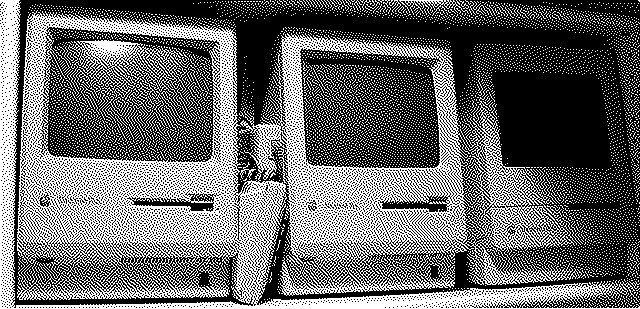
    Classic Mac Flickrdither

    I moved on to a PowerBook 165 running ClarisWorks and early Internet software.

    I managed to connect it to the net through my university and surf in 16 shades of grey. Some of the software I recommend has been maintained almost as long as I have been a Mac user which says something about the power of developer’s core ideas.

    At the time there wasn’t the Mac user community that there is now. But what users there were made up for their lack of numbers with fierce passion.

    When you bought a Mac you could tap into a real world community. My University user group met once a month and swapped software and tips.

    It was this rather than the iMac which made sure Apple had a user base by the time Steve Jobs returned. Mac related magazines filled in the knowledge gap and carefully curated demo software. It was through this experience that I learned about some of the apps here. I have stayed loyal to them over the decades and upgraded them as required.

    Nowadays there is a larger, but less passionate community. We tend to share web services rather than apps. We also tend to gather around the biggest rather than the best. I am a great believer in supporting independent development where the applications work better for me. This the lens that I view software through in making the recommendations below. Some of the recommendations come from people I trust like Mat Morrison. Where I have shared a piece of software I don’t use I’ve made this clear below.

    Despite the disappointing* product designs of the last two MacBook Pro revisions, I’ve been surprised as a few more friends move to the platform. They’ve sought advice myself and other friends. So I thought I’d consolidate the knowledge and put it out there.

    The process caused me to reflect on the software that I use and value. I like:

    • Products that work both online and offline, so Hemingway’s native app made it in rather than the Grammarly Chrome plug-in. Internet isn’t as ubiquitous as one would have you believe, God knows I love technology, but I am not blind to its faulty implementation
    • Products that seem to be mature and have gone through a couple of development cycles
    • Software has to fit me, rather than the other way around. I’ve built up behaviours over my time using computers and networks that seem to work for me. But we have different learning styles and habits, which was part of the reason why I’ve suggested choices that I don’t use but others like. Chances are one of them will work for you, but not all of them will
    • I prefer not to depend on web giants like Google, Facebook et al when it comes to software. Their ‘always in beta’ philosophy can make for inconsistent product experiences – look at how the Skype consumer platform UI and functionality has changed for the worse over time. ‘Always-in-beta’ also results in abrupt ‘sunsets’ – that’s tech speak for killed off. This happens for a few reasons. The bigger they get, the bigger a service has to be in order for it to be worthwhile supporting. Their product strategy is about you as a product rather than you as a user. This is true if its an application or an API. Their entry into a market can see them decimating small competition; once that has been completed if there isn’t megabucks they’ll leave just as fast. The RSS news service Google Reader is an exemplar for this process. I love new shiny things as much as the next nerd, but I also don’t want to invest too much into them if they can disappear just as quick

    Communications

    Communications used to be a simple process for me, as I used to run Adium.

    At one time Adium supported ICQ, AIM (AOL Instant Messenger), Google Talk, Yahoo! Messenger and MSN. Adium still exists but many of the main instant messenger platforms don’t. These days things are a little more complicated for me.

    I run Apple’s Messages.app which allows me to use my iPhone’s SMS service and contact other Apple product users. It’s encrypted which is nice. It’s so simple, even my parents have managed to master it.

    I use Slack to keep in touch with a number of professional groups.
    My friends in China and Hong Kong use a mix of WhatsApp desktop app and WeChat’s desktop app.

    I don’t use it so much any more but LINE and Kakao Talk make a couple of good desktop apps too. The Economist and Wall Street Journal do good content on their LINE channels. Bloomberg and the UK agency Battenhall publish some good content on WhatsApp that are worth subscribing to.

    I use the consumer version of Skype to dial into conference call bridge numbers. I have used Skype for Business whist working at Unilever and Publicis – it wasn’t a positive experience.

    I know some friends that find Franz handy, it seems to support an eclectic collection of services; but not all the ones I need covered.

    Evernote alternatives

    Evernote wasn’t the innovator that many people think it is. DevonThink and Yojimbo have been longer in usage amongst a small but dedicated Mac user base.

    DevonThink – positions itself as document management. It also syncs across devices. It is an expansive and thorough piece of software, I’ve tried it. It’s great, but just wasn’t for me. Devon Technologies also have some interesting products that do web and system search. They have been handy for friends in recruitment headhunting research.

    Yojimbo – In my personal experience I found Yojimbo easier to use than DevonThink. Both are great tools, but its a question of what makes the most sense for you. I think you should try both and see which one works best for you.

    Graphics

    OmniGraffle – great for diagrams and flow charts. OMNI are long time Mac developers and always seem to get the most out of the machine.

    News

    I have been vocal in my love of Newsblur RSS reader on other occasions, so won’t go into how fantastic it is here. I use a native Mac app called ReadKit to interface with Newsblur, Pinboard and Buffer on my Mac. This was really handy when I was in China, as the internet operates differently there.

    ReadKit also has good integration with Buffer and Pinboard.in; services I use for social posting and bookmarking respectively. ReadKit isn’t perfect; in particular its persistent windows for posting to Buffer and Pinboard.in can annoy; but it works for me.

    Office software

    I use the default macOS applications Mail.app, Calendar.app and Contacts. app. They work flawlessly with iCloud to sync across iPhone, iPad and Macs. I have Google hosted, Microsoft Exchange and IMAP based accounts running on Mail.app side by side with no problems (so far).

    I use the home edition of Microsoft Office (for Word, Excel and PowerPoint). Going for the home edition is a fixed cost rather than an Office 365 subscription. I use Hemingway to handle the creative process of writing and provide some editorial input. If I am writing a presentation for myself then I will use Keynote instead of PowerPoint.

    I use OmniPlan as an equivalent to Microsoft Project.

    Music

    I still listen to ripped music on iTunes. Streaming services like Spotify often have a limited library of back catalogue music. Carefully curated playlists can see tracks disappear in an arbitrary manner when rights owners pull them from the streaming service. I listen to old DJ mixes, digitally bought music from BeatPort, iTunes and Bleep. I also rip CDs as often these are cheaper than their MP3 counterparts or haven’t made it into online music stores. iTunes also handles my podcasts and audio books. I have an iPod Classic that’s tricked-out with a 256GB SSD. I don’t run my phone’s battery down listening to music. I have been keeping track of my listening using last.fm’s app.

    Productivity

    BBEdit is a 25-year old piece of software for the Mac. It is a text editor but always comes in more handy than that descriptor implies. It’s one of them applications that I discovered on a Mac Format or MacWorld demo disk and then kept on using.

    I haven’t used it, but Duet looks like a handy way of bringing a secondary screen around with you, if you are working out of client offices.

    OmniFocus – list writing made better, but also handy for getting thoughts down on a presentation etc

    Parcel – comes in handy for keeping an eye on your package deliveries.

    PopChar X – I have been using PopChar since I was in college. I got it on a demo disc from MacFormat and immediately saw its benefit. Twenty years later I am still using the application.

    Screen grabs

    Papparazi is my go to screen grab tool, Skitch comes highly recommended from people I trust.

    Utilities

    Apple has got an annoying habit of taking ideas from great utilities and including them in future versions of macOS. This is great for users, but bad for Apple’s long-suffering developer community. It was independent developers who kept the faith during the dark times of the mid-1990s.

    coconutBattery – recommended by a friend who uses it for ensuring that apps aren’t drawing excessive power when you’re on a battery. Here’s looking at you Google Chrome!

    GraphicConvertor – yet another app that is over 20 years old and still supported. It manages to handle the most arcane graphics formats and allows you editing functions.

    Fetch and CyberDuck – Fetch and Transmit have been the go to Mac apps for FTP clients for a long time. Familiarity for me means that Fetch edges out Transmit. Both are great pieces of software that I am happy to recommend. It is also worthwhile considering CyberDuck which is open source. CyberDuck has also done work on supporting Amazon and Google storage which some of my friends find invaluable.

    Little Snitch – in the world of Mac users Little Snitch used to be famous for stopping Adobe software from phoning home. This was back before Creative Cloud when buying software was a major investment for agencies. So there was an interest in cracked user codes and careful monitoring of your network connection. Little Snitch is very useful these days as a really good firewall application.

    Stuffit Deluxe – yes you can do a lot in terminal but you’d be hard pushed to find a compression app that handles as many formats as Stuffit. I even opened up some 20 year old .sea archives from my time in college.

    TechTool – machine health monitoring that has been around since the dark days of the Mac. A great application to keep your Mac running the way you want it to.

    Terminal.app (default app) – macOS is built on a proper operating system NetBSD and the Mach micro-kernel. Terminal allows you to access the power of the operating system. But with great power comes great responsibility, I strongly recommend some additions for your bookshelf. O’Reilly Publishing has some great books that provide advice on how to use the terminal notably Learning Unix for OSX. David Pogue’s Missing Manual series for macOS are worthwhile as references as well.
  • Nokia N950

    Nokia N950 origins

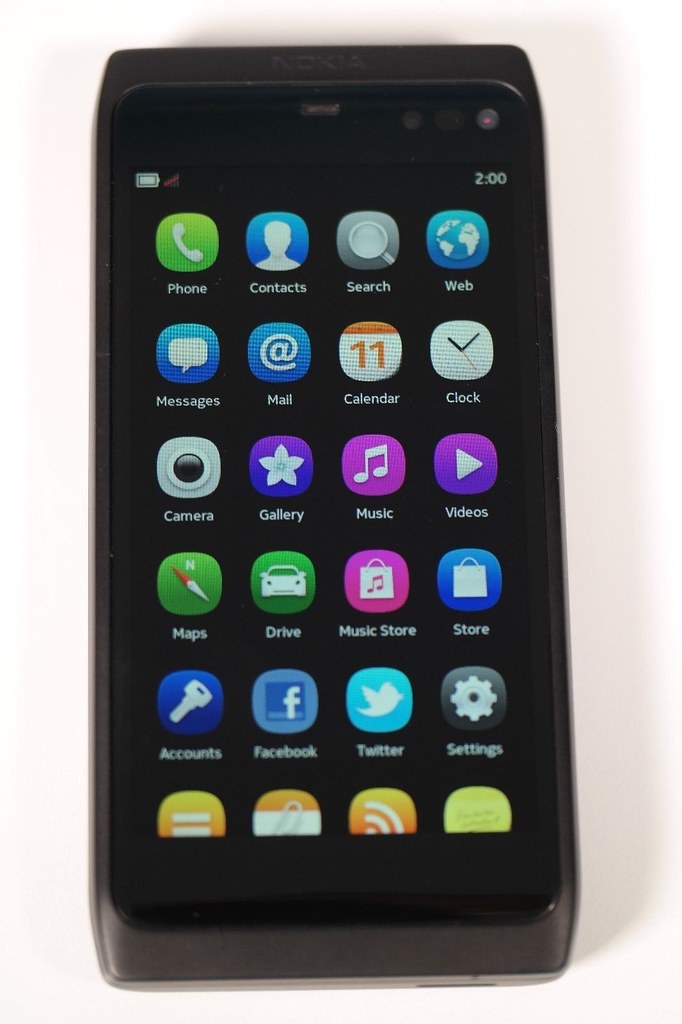
    The Nokia N950 was designed at a weird time. Nokia’s position as the premier smartphone maker was under siege from Android and iPhone after seeing off the Palm OS and numerous iterations of Windows Phone. Nokia had missed the boat on devices with capacitive touch displays. It was using a smartphone operating system that was starting to show its age, a bit like PalmOS did previously. Like Palm, Nokia wasted far too much time coming up with its next generation OS, which gave Google and Apple the opportunity gap that they needed.

    Part of the problem was that Nokia was wrong for the right reasons:

    • Different consumers do need different types of phones, which is why HMD have managed to resurrect modern versions of classic Nokia feature phone designs
    • Phones are better if they can be operated one-handed. Whereas Google and Apple busied themselves designing computers that happened to be phones
    • Phones needed to be made down to a cost. So the handsets were different on the outside but had common ‘guts’, which meant that premium products could  be underpowered

    Nokia had their own answer to Android and iOS in MeeGo which grew out of work that Intel and Nokia had separately done on mobile Linux. Nokia was partnering with Intel partly because it believed that Intel was the future of mobile.

    The Nokia N950 was a development handset showcasing this operating system in action. It was similar and related to the N9.

    The N9 was released in a limited amount of markets were it was successful. However the N9 success story was overshadowed by the larger business problems Nokia faced in its transition from Symbian and feature phones to Windows Phone.

    There were an estimated 5,000 Nokia N950 handsets made in total, which went to the Nokia global developer community. Technically there are loaned devices rather than given to developers. They occasionally appear on eBay going for 1,000GBP+

    Up close with the Nokia N950

    At first glance the Nokia N950 looked like a chimera of the N9 and the N8 with a slide out keyboard riffing on the Communicator form factor that Nokia pioneered.

    It makes sense to list the differences with the N9 first of all:

    • The Nokia N950 had a TFT LCD screen roughly the same size as a Nokia E90 Communicator, but with a higher resolution. The N9 had an AMOLED screen which is slightly smaller and has a slightly higher resolution
    • The N9 was made from the same machined polycarbonate body that then made its appearance on Nokia Lumia models. The Nokia N950 has a case made from a mix of machined and stamped aluminium parts and came only in black (though I have seen pictures of un-anodised devices as well. These were probably pre-production prototypes)
    • They had different camera modules that performed broadly the same
    • The Nokia N950 had a pop under keyboard similar to  the N8 and E7. More on that a bit later on
    • The Nokia N950 had 8.5GB of usable storage compared to up to 64GB of memory in the N9
    • The N9 has a slightly larger battery than the N950, but the difference wouldn’t have been noticeable due to the difference in screen technology

    What you end up with is a phone that still looks modern (partly due to its anodised black case making the screen edge harder to spot.

    Nokia N950

    The device is slow compared to modern devices but is speedy for its time. The device flipped from landscape to portrait mode, but this wasn’t perfectly implemented.

    Nokia N950

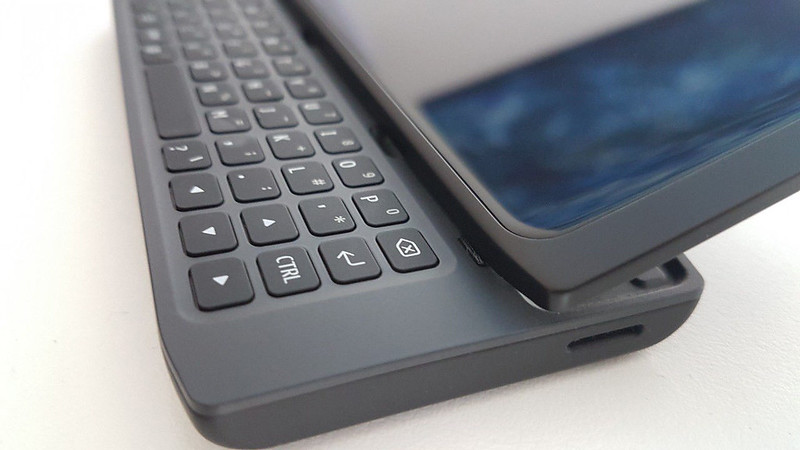
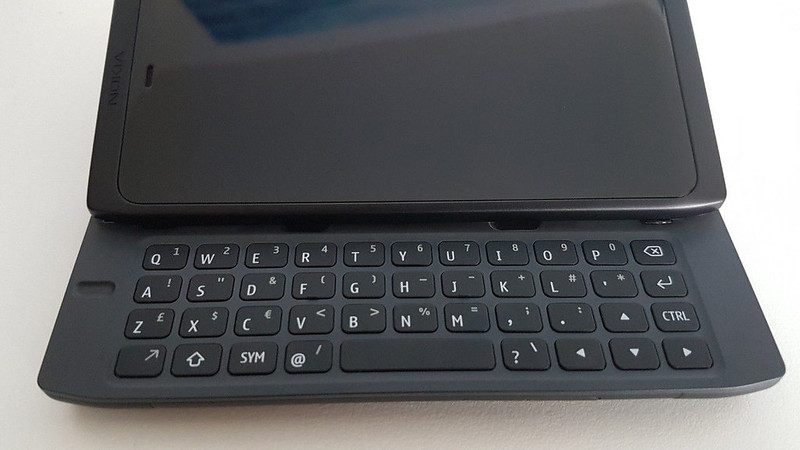
    It had a pop under keyboard which allows the device to have a really shallow design in comparison to Communicator devices. However it does leave the screen exposed to damage. The past decade of Gorilla Glass™ screens on iPhones and Android handsets proves that the Corning wonder material is not invulnerable.

    Nokia N950

    The problem with the design means that you end up with a shallow area for the keyboard. The Nokia N950 like the E7 and N8 don’t have as full a featured keyboard as the Communicator devices.

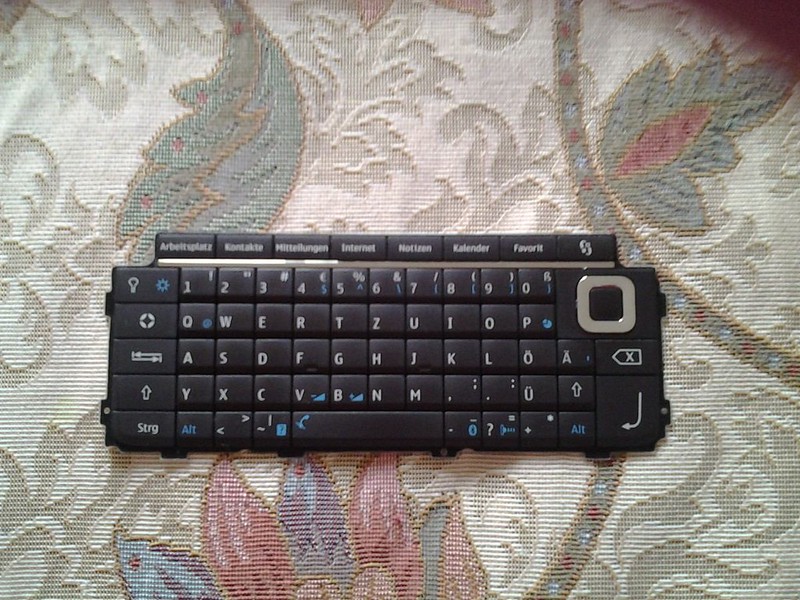
    10 - E90 keyboard

    Here’s a keyboard from the E90 by comparison. When you were using the Nokia N950 you end up with a virtual keyboard on the screen  providing the tab,  ctrl, esc and alt keys, as well as very commonly used symbols.  Which begs the question of how useful the keyboard would really be for developers?

    Compared to the modern iPhone, the N950 meets the goal of a mobile computing device much better. You can write longer emails and documents on the keyboard than the iPhone. The camera is adequate for most people’s needs and it shows in some respects how little the smartphone concept has moved on over the past seven years.

    Could the Nokia N950 been the future?

    Historically Nokia’s Symbian phones had been built on TI’s OMAP processors; but these didn’t have a roadmap for 4G wireless. Nokia had two choices bet on Qualcomm or Intel. Qualcomm had come out on top in IP related disputes, which probably made Intel seem more attractive. Intel was also championing WiMax as a 4G standard.

    WiMax had limited adoption at best, Nokia was on the wrong side of networking standards and eventually was forced to use Qualcomm processors in Windows Phone reference designs.

    `Nokia could have gone to Snapdragon processors but its joint relationship with Intel on the software side of things would have been tainted. There is also no guarantee that Qualcomm would have been a helpful partner given the history between the two companies and that both Android and iOS devices used Qualcomm products.

    Secondly, Nokia bet all the marketing budget on the Lumia device launch which left nothing for the MeeGo devices.

    Finally, Nokia would not have been able to get out of the legal contract that they had with Microsoft. The only way MeeGo would have stood a chance is if the Nokia board had not approved Stephen Elop’s proposal to go with Windows, rival schemes to go with Android and bet on the home team.

    • At the time the internal Nokia option would have looked high risk. Board members would have been familiar with historic project problems on Meamo and then MeeGo
    • Secondly Nokia had a history of buying in new generation operating systems. It licensed GEOS  for the Nokia Communicator 9000 and 9110. It licensed and then bought into Psion’s OS business unit, which became Symbian
    • Nokia’s feature phones ran on homegrown technology built on Intelligent System Architecture (ISA), also called the Nokia Operating System (NOS)
    More information

    TIMELINE: Qualcomm vs Nokia patents battle | Reuters
    Qualcomm loses GSM patent fight with Nokia in German court | Ars Technica
    Why Qualcomm Folded to Nokia | Bloomberg BusinessWeek (paywall)
    The ‘I Wish I Had Known This’ List about 101 Things Wrong With Windows Phone Smartphones Like Nokia Lumia | Communities Dominate Brands
    How Many Lumia Sales? As Nokia (and Microsoft) ashamed to reveal number, lets count – and compare to N9 MeeGo sales | Communities Dominate Brands
    Nokia N8 review | GSMArena