Category: howto | 怎麼做 | 방법 | 実行する方法

Howto as a category morphed out of a few things. I learned about the power of helpful content from Stewart Brand’s Whole Earth Catalog. A second aspect of it was my natural inclination to share useful hacks.

I started writing this blog to explore the media so that I could advise clients so its roots were in the howto mentality. Over time, I built up a certain amount of authority based on the content that I shared here. This resulted in work for Econsultancy, teaching MBA students at a private Spanish university and a number of agency jobs.

Howto content tends to come when I am sharing skills and I have been developing AND that these skills can be easily codified into an article or two. I have also shared my personal workflow that I use to try and make sense of the world through online resources.

Many of the skills that I developed doing that came from a pre-social platform dominated world. Before Instagram told us how to look and TikTok told us what to think. And back when Google was actually useful, well more useful than it seems to be now.

I even wrote a couple of guides on how to get the most out of Google, but most of the advice won’t work any more as the platform did away with many shortcuts in favour of telling you which is the nearest coffee shop with free wifi.

The reason why howto ended up being one word rather than how to was down to the early version of Wordpress that I started to blog on and my lack of expertise more than anything else.

  • Montblanc + more things

    Montblanc

    Montblanc launches connected pen and paper | Luxury Daily – interesting move by Montblanc. The technology for connected pens similar to what Montblanc is doing has been around for a while. However it is interesting seeing a luxury brand like Montblanc enter the field. Montblanc has also done interesting things in wearables as well.

    Business

    Chinese Billionaire Linked to Giant Aluminum Stockpile in Mexican Desert – WSJ

    Culture

    A great documentary on the (little known in the UK) early 1990s US rave scene that blossomed on the west coast and gave us the likes of Hawke, The God Within aka Scott Hardkiss, Onionz and the like.

    Design

    The last day of hot metal press printing at the New York Times

    Media

    WeChat and Brands | WeChat Blog: Chatterbox – Caesars Entertainment and interesting concierge bot trial

    Evolving App Store Business Models – David Smith – move to ads from payments or subscription pricing

    Security

    Cisco’s Network Bugs Are Front and Center in Bankruptcy Fight – Bloomberg – and there is the opportunity for other vendors to get in

    Now for a more disturbing piece of technology, that my colleague Matt shared with me: OfferMoments looks like a privacy nightmare a la Minority Report. I found this a disturbing 90 seconds of viewing as marketing walks all over privacy in an unprompted very intrusive manner.

    Software

    Instagram lawyers tell owner of anti-litter app to change its name | The Guardian – interesting move, will this open the door for them to go after the likes of Telegram (messaging app) later on

    Wireless

    Un-carrier Network List of Firsts | TelecomTV Tracker – summary of T-Mobile US rollouts

    Apple Plug – neatly skewers the iPhone 7

  • On Writing

    This post was prompted by reading A Time To Write by Wadds, open it in a new tab on your browser and give it a read.
    Cover on my old book
    Given Wadds’ post I thought I would reflect briefly on my own process.

    Why I write?

    Wadds describes his writing as a kind of mindfulness.  For me writing serves a number of purposes:

    • It cements things in my memory, a bit like revision at school
    • It helps me work out ideas and my stance on them
    • Its a good platform for experiments. I started off my blogging to work out how it could help clients that I couldn’t get media coverage for. This was back before social media was a thing. At the moment I am using this blog  as part of an experiment on LinkedIn Pulse as a source of traffic. More on that when I have a decent set of data
    • Occasionally decent conversations spark of these posts, some of my good friends are online
    • There is a more talented fighter than I, also called Ged Carroll. I like to have a clear differentiator from him
    • My blog is also a marketing calling card, I have got jobs from it over the years.

    Wadds talks about why people don’t write, he describes it as effort and bravery. I suspect its a bit more complex. Yes life does get in the way for many people, but many of my friends have their own creative outlets: painting, photography, the art of social conversation, mastering video games to name but three.  For me writing extends out of curiosity, it is a natural progression – otherwise ideas would vanish into the ether.

    In terms of bravery, Wadds talks about the willingness to share private or personal subjects. I generally don’t, the reason is quite simple. Growing up in an Irish household, my time was predominantly spent in the UK during The Troubles, I grew up with the idea of the pervasive, invasive surveillance state. I grew up with a personal perception of what could be called ‘operational security’ (Op-Sec). The future has finally caught up.

    Workflow

    You can break my workflow down into four sections:

    • Ideation.  Ideas broadly come from reading something or the world around me. If it is something on the world around me, I will make some bullets in the notes application of my iPhone.  If it is a talk I will have likely recorded it using Olympus’ free dictation app for the iPhone. If it is from reading a book, I am likely to put post-it notes on the relevant pages with some notes and then flick back through this as I write a post. I have aversion to writing on the books themselves. I have found that I don’t get much out of reading on a Kindle, so only use that for leisure reading now. If  I am inspired by something I have seen, there will be a picture on Flickr, which also serves as the image hosting platform for this blog. I have about 46 GB of images in my Flickr account – it would take a major tectonic event to persuade me to move to another platform like 500px. I have a Twitter account with a set of lists that provide inspiration and use Newsblur as an RSS reader as well. Newsblur is invaluable. I am currently trying Breaking News, an app recommended by Richard Edelman and occasionally dip into Apple’s own News app. When I have online content that has spurred a writing idea I will notate it in my bookmark service pinboard.in
    • Writing. My writing method varies based on two criteria; the regularity of the post and the length of the post. If you’ve read my blog for a length of time you will see that there are repeating themes. Every two days is a collection of interesting links from around the web. These posts are based on content that I bookmark. There is a post on Friday for interesting creative or useful things, again this pretty much writes itself based on my bookmarks as I ingest the web. At the moment I am publishing slides of data that I have collected on a monthly basis, I usually write a bit of analysis on the some of the data that I have surfaced. This just flows out easily. For short irregular posts they are often a stream of consciousness with minimal editing directly into WordPress. Longer posts are often mind-mapped onto engineering squared paper and then written into Hemingway
    • Editing. Unlike Wadds, I don’t have an editor. I use Hemingway app as a machine-based editor. My fact-checking happens before words are committed to the posts in my reading around
    • Syndication. I syndicate my content using plumbing that I have put int place using IFTTT and WordPress’ own JetPack plug-in. When I syndicate to Medium and LinkedIn this is done manually.

    Wadds’ talks about mindfulness in writing. I don’t necessarily think that its the same for me.  That feeling of being in the zone is something I get more from DJ’ing ironically, or focusing on a mundane task. Writing is more about making fleeting ideas permanent. It is also written with at least half an eye on my work.

    More information
    Olympus Dictation app
    Flickr
    Newsblur
    Twitter lists
    pinboard.in
    Breaking News app
    IFTTT
    JetPack
    Medium

  • Tools part of my process – part two

    I posted part one in this two-part series of ‘part of my process’ posts on my blog. Part one covered Hemingway, Pinboard, Terminal and IFTTT. In this post I will cover tools that I use for content discovery and publication.

    Right Relevance

    Right Relevance is a web service that recommends content from social channels. It is based on areas of interest. Klout provides a similar function as part of its social measurement service. I could write a whole blog post about what’s wrong with Klout’s measurement approach. But their content recommendation function is alright. I have found from experience that Right Relevance tends to provide better quality recommendations.
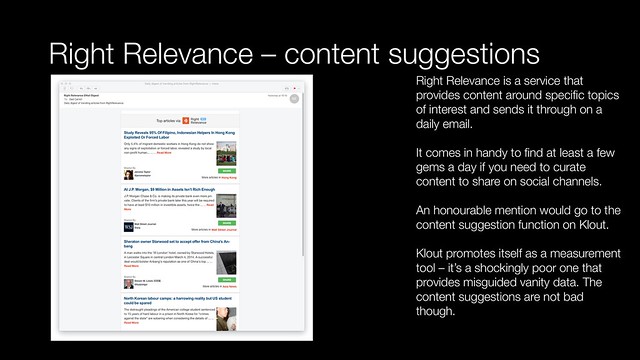
    Right Relevance
    For specific subject areas there are ‘subreddit’ threads at Reddit. Certain subject areas like technology have special purpose sites: for instance techmeme and Slashdot. I have included some more geek orientated options at the bottom of this post

    Newsblur

    The way I explain RSS to my non-tech forward friends is by an analogy. RSS is the web’s analog of a ticker tape machine. In Western’s that is the machine which put incoming messages on a strip of paper. While outgoing messages went out in Morse code on a telegraph key. In the stock exchange or newsroom; continuous computer paper replaced the thin strip of paper. A teletype machine or computer printer would print messages as they came in.

    RSS sends updates from websites in a way that applications can collect the content up. Different services present it in different formats like an email type interface or digital magazine. Most people were familar with RSS from its use with Google Reader. When Google Reader shut down, it didn’t kill RSS. Instead a cottage industry of RSS readers sprang up to replace it.
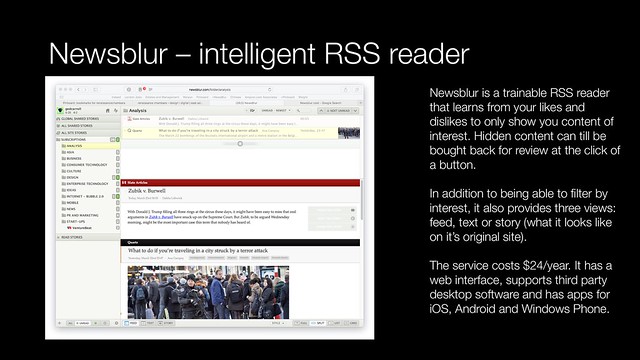
    News blur - intelligent RSS reader
    My RSS reader of choice is Newsblur. Newsblur has several benefits. You can train it to filter your feeds based on author or key words over time. The unread posts can be uncovered with one click and read if you still need to.

    It provides three different views

    • Feed – the information as its provided in the the RSS feed. Depending on the feed this may contain images
    • Text – text only. Handy for when you need speed as it filters out formating and images
    • Story – what it looks like on the original site. This helps understand the context where other content is on a page alongside the main story

    Newsblur has a good in-browser interface. It provides integration with both Pinboard and Buffer. It also supports Reeder, a popular desktop RSS reader for OSX.

    Newsblur has a native application for both iOS and Android. A third party wrote a free native application for Windows phone. In the past there was also support on Symbian, Maemo and BlackBerry. You get a lot for your $24/year subscription.

    Buffer

    Buffer is the social publishing tool that I use. It provides similar benefits to Hootsuite, but is much more user friendly. Buffer also has a transparent pricing model compared to Hootsuite. It integrates in my process via IFTTT. Buffer has a native app for iOS and an in-browser interface. It integrates into sharing functionality within iOS and Newsblur. It is the end point in my automated plumbing for social content publication.
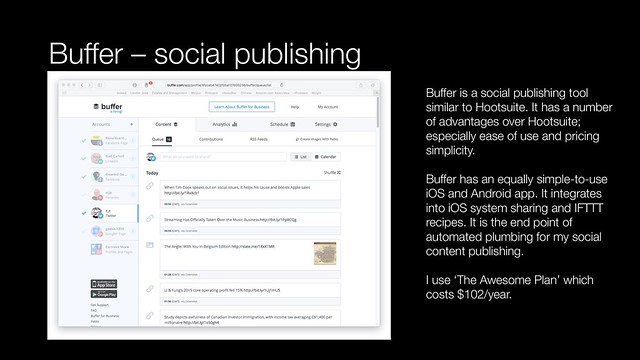
    Buffer social channel publishing and analytics
    It has good basic analytics built in. I use ‘The Awesome Plan’ which costs $102/year.

    Weiyun

    Weiyun is a cloud file storage and sychronisation service like Dropbox. The key differences being, it is only available in Chinese and it provides 1TB of storage for free.
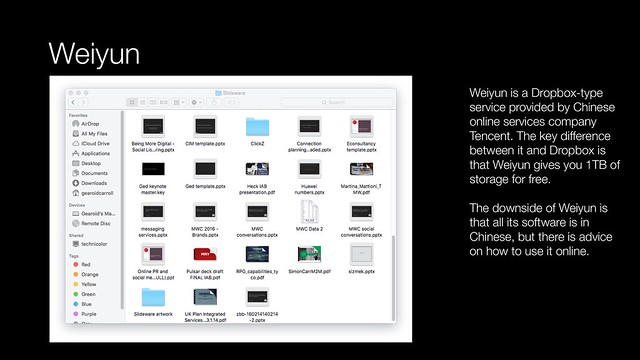
    Weiyun - cloud storage and synchronisation
    Weiyun has Android, iOS, Windows and OSX applications.

    Here is a presentation hosted on Slideshare that highlights the tools discussed in today’s ‘part of my process’ post.

    More everyday tools in part three.

    More information

    Right Relevance website
    Klout – ignore the measurement, but stay for the content recommendations

    Reddit
    techmeme – curated by a mix of algorithms and an editorial team
    Hacker News – based on a community who find interesting geeky stuff around the web

    Newsblur (once you subscribe it provides you links to the different mobile apps)
    Reeder – a third party RSS reader for OSX which supports Newsblur

    Buffer

    Weiyun English interface
    How to use Weiyun

  • Hemingway + process

    I use a range of tools including Hemingway as part of my content creation process. This came out when I had a meeting with some junior marketing agency staff last week. The purpose of the meeting was to discuss content strategy across different clients. In the end an good part of the conversation went into process and content creation.

    Given that conversation I thought it might be fruitful to flag up some of the technologies that I use.

    Hemingway

    I use Hemingway ( a web application and a native OSX application) to write. Hemingway has two writing modes:
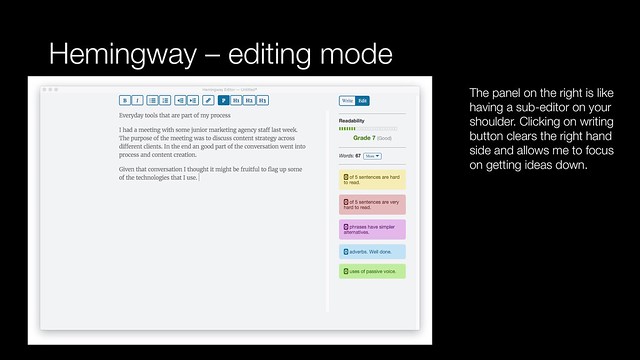
    Hemingway - editing mode
    Editing mode looks at your copy as you create it:

    • It looks at readability providing a reading age score. (Grade six is equates to 11-12 years old). The lower the reading age, the clearer the writing is. It has also aids in SEO
    • It examines sentence structure, the harder a sentence is to read, the more ambiguous it may be.
    • Hemingway suggests simpler alternatives to phases
    • It looks at adverbs and use of the passive voice

    Hemingway is like having a sub-editor sitting on your shoulder at the point of creation.
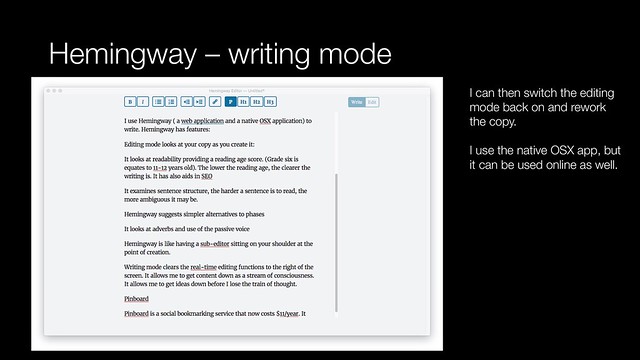
    Hemingway - writing mode
    Writing mode clears the real-time editing functions to the right of the screen. It allows me to get content down as a stream of consciousness. It allows me to get ideas down before I lose the train of thought.

    You can then switch to editing mode to go back and clean up your copy once you have it down.

    The OSX version allows you to save documents down as a HTML file, from which you can cut and paste into a destination. It just works whether its a presentation, document, WordPress or social platforms.

    Pinboard

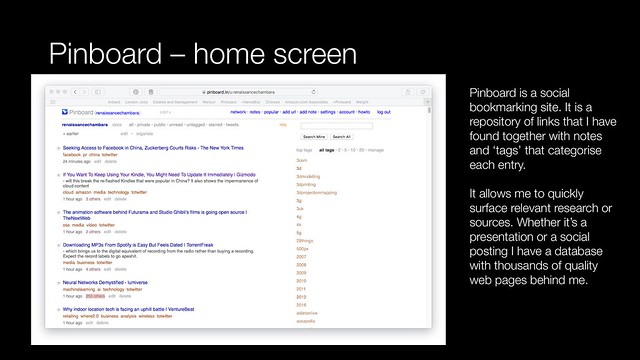
    Pinboard is a social bookmarking service that now costs $11/year. It allows me to store links and notes about websites that I find of interest.
    Pinboard - home screen
    Pinboard is a web service so my bookmarks go where I can get a web connection.
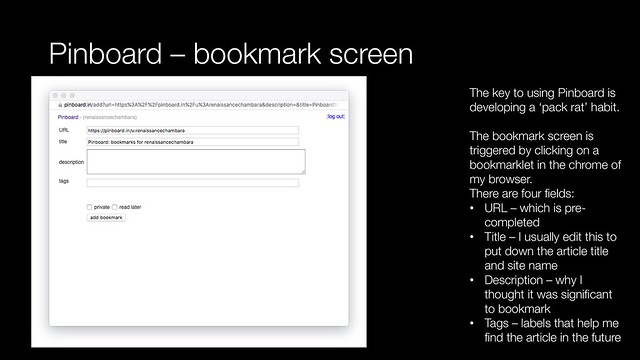
    Pinboard - bookmark screen
    I use a bookmarklet that sits in the chrome of my browser. Every time I come across something that might be of interest, I click on the link and complete a simple form.

    • URL – I only change the link if it is a temporary link such as ‘feedproxy.google.com’. I expand the link or change it to any permalink that is on the page
    • Title – I edit this as necessary to reflect the article title and the website name
    • Description – this is a quick explanation of why I thought the page was significant. It might be an article quote or top statistics mentioned
    • Tags – categories or labels that I assign to an article which allows me to find it based on a relevance. Tags are used by other applications as well

    I use Pinner for iOS on my iPhone. It integrates into the system level sharing functionality. I can create bookmarks on the move as well as at my desk.

    Terminal

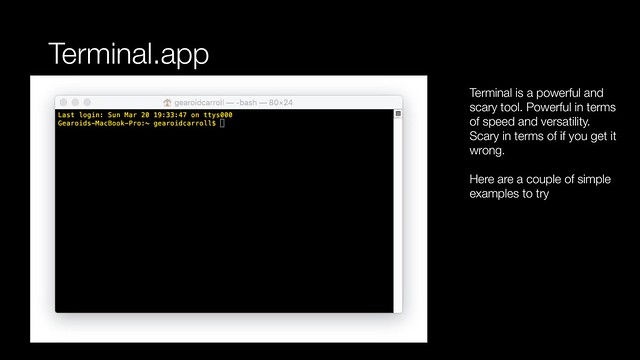
    The Terminal app in OSX allows direct access to the power of the operating system. It is also unforgiving. Getting a command wrong can have serious consequences.
    Terminal app - introduction
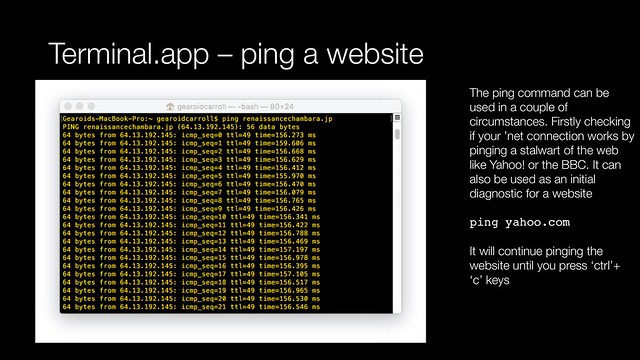
    There are a few things that I can do faster in terminal than via other methods. From checking  differences in documents, to batch processing file archiving. To get you started here are two examples that you can try: to see if a website is up to getting a weather forecast.
    Terminal app - check the weather forecast
    Terminal app - ping a website
    I have a copy of UNIX in a Nutshell from O’Reilly Media on my bookshelf. I use this as a back-up when I can’t remember the proper  syntax or a command. I can also recommend Learning Unix for OS X: Going Deep With the Terminal and Shell also from O’Reilly Media.

    IFTTT

    At the beginning of 2007 Yahoo! launched an experimental product called Yahoo! Pipes. It was flakey, it was unreliable but also revolutionary. Pipes was an easy way to stitch together services without programming expertise. After years of flakey service it was shutdown by Yahoo! in June 2015.
    IFTTT
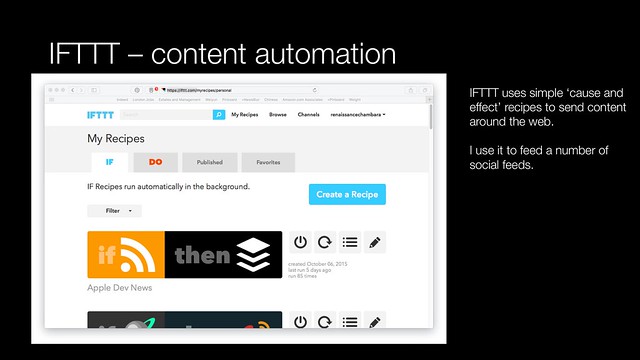
    Pipes inspired another service IFTTT. IFTTT stands for ‘If then, then that’. It is a simple cause and effect framework that allows for the automation of actions over the web. These cause and effect formulas called recipes. It supports a range of web services and apps. Most of the discussion around this for Intenet of Things automation. I use it to automate my web content content.

    More in part two.

    I pulled part one together in a companion presentation.

    More related content can be found here.

    More information

    Hemingway OSX application

    Pinboard

    Pinner app for iOS

    IFTTT – (If Then, Then That)

    Books

    Learning Unix for OS X: Going Deep With the Terminal and Shell by Dave Taylor

    UNIX in a Nutshell by Arnold Robbins

  • Lotte + more news

    Lotte

    Lotte shareholders reject bid to remove Chairman Shin Dong-bin as family feud continues | The Japan Times – particularly interesting Chaebol feud given the unique Japan-Korea structure of Lotte. Lotte in Korea is huge in FMCG, entertainment, hospitality and retailing. Lotte has been driven out of China by the government. More Korea related posts here

    Business

    Changing of the Guard – Edelman – nice bit of shade by Richard Edelman on group margins and independent versus publicly listed holding groups

    Consumer behaviour

    Which Generation is Most Distracted by Their Phones? | Priceonomics

    Economics

    Silicon Valley Has Not Saved Us From a Productivity Slowdown – The New York Times – In mature economies, higher productivity typically is required for sustained increases in living standards, but the productivity numbers in the United States have been mediocre. Labor productivity has been growing at an average of only 1.3 percent annually since the start of 2005, compared with 2.8 percent annually in the preceding 10 years – Silicon Valley failed

    How to

    Tracking story changes with NewsBlur – as if NewsBlur’s learning technology and mobile clients aren’t enough, being able to track changes on stories is a powerful online journalism tool

    Ideas

    The People’s Net – Douglas Rushkoff’s original article on the dot com crash for Yahoo! Internet Life revisited for the current age of unicorns – Time to channel my inner Dave Winer – Joi Ito’s Web and Joichi Ito on the same theme

    The rise of American authoritarianism – Vox – scientific explanation behind Trump but also the pervasive fear of terrorism that has gripped the west

    Korea

    As 4th trial nears, Samsung asks judge: Make Apple stop talking about Korea | Ars Technica – it because perhaps they’ve mentioned the dishonest involvement in political slush funds as background to explain relative brand honesty and trustworthiness?

    Media

    Maxus launches mood-based planning tool | Marketing Interactive – interesting, particularly with political campaigns

    Welcome to the Era of Programmable Marketing – The AppNexus Impressionist – great primer on programmatic

    China’s new television rules ban homosexuality, drinking, and vengeance – Quartz – so that leaves dramas about patriotic war against the Japanese sans Nanking massacre and dramas about Mao sans cultural revolution

    Online

    Apple is Running BitTorrent Trackers in Cupertino – TorrentFreak – Using the file-sharing protocol, we launched a side-project called Murder and after a few days (and especially nights) of nervous full-site tinkering, it turned a 40 minute deploy process into one that lasted just 12 seconds – interesting article that touches on the enterprise use of BitTorrent. I suspect Apple’s use of trackers is IP enforcement related

    Retailing

    It’s Discounted, but Is It a Deal? How List Prices Lost Their Meaning | NYTimes.com – interesting article. I remember being shocked when I was first guided through Shenzhen’s markets where products originally destined for UK markets were sold to local consumers – with price reduction tags already attached.

    No surprise with Powa | Steven Prowse – almost as good as The Kernel’s legendary dissection of SpinVox

    So how much was Powa Technologies really worth? | FT Alphaville – clear gap between claimed value and real value even before administration (paywall)

    Adidas to operate 12,000 shops in China by 2020 in bid to tap growth in leisure wear, sports participation – interesting that they are going to 3,000 additional real-world stores rather than focus on e-tailing (paywall)

    Security

    Swarm of Tiny Pirate Transmitters Gets the Message out in Syria – could also reinvigorate pirate radio…

    The FBI Might Be Apple’s Best Ally In iPhone Encryption Flap | Fast Company – the government messed up and its backfired

    Software

    Microsoft canceled $8 billion Slack bid due to Bill Gates and Satya Nadella pushback – Business Insider – Qi Lu would have known Butterfield from Yahoo! ,both worked in the search business at the some time

    Why I’m breaking up with Slack | Quartz – interesting perspective

    Wireless

    In Search of the Amazingly Elusive Non-Smartphone Owner | Recode – not really surprising. I imagine the privacy aspects might encourage a small set to follow them