Blog

  • Fall of Nokia & other things this week

    BBC 4 ran a great hour long documentary film: The Rise and Fall of Nokia is an oral history on the fall of Nokia from Nokia veterans. You can’t give a good comprehensive telling on the rise and fall of Nokia story in just one hour, but you can get a sense of what Nokia was. Some of the culture change that came with success  was really, really  dark. More on Nokia here.

    Danny Dyer nailed the zeitgeist on Brexit last week. Which led some the B3ta community to put together the Danny Dyer Presents: “Pwopa Nawty Noises!” (B3ta.com) – livens up conference calls no end.

    I was a big fan of HBO’s The Newsroom drama; it was more of the intelligent dramas over the past few years. The intro to the first episode seems even more prescient now

    I am very late to this but Techcrunch’s Bubbleproof drama from last year neatly skewers the current state of technology start-up culture (in the west at least).

    I’ll leave you with this amazing animated film from Hong Kong. It’s on KickStarter for funding and looks amazing with hints of traditional martial arts films, science fiction and psychedelia. More information on the film website.

  • How to use RSS?

    How to use RSS – isn’t a question that I thought would be ever asked. I put together a guide some eight years ago and had been meaning to update it for a while. I was reminded to do this by Wadds recent post on RSS. I realised  there is likely a whole generation of netizens that hadn’t used RSS; or had used Google Reader and didn’t have a clue about what under-pinned it and how it could be useful.

    RSS is dead‘ is a myth beloved of the social networks that want to spoon feed you algorithmically sifted world views. This myth has leaked into web development circles and I have had to fight with development teams to keep in support for the standard.

    Put simply RSS is like a ticker tape for the web that allows you to get updates about new articles posted on websites.

    My own journey in how to use RSS

    I started off using RSS readers with NetNewsWire. NetNewsWire was an application  that developed a swift cult following on Mac OSX. This would have been late 2002. I immediately saw the benefit as a PR person, having the news come to me, rather than having to go do a round robin of a list of sites in my browser bookmarks.

    An RSS reader allows you to:

    • Collect updates from 100s of sites that you wouldn’t otherwise have time to get around
    • Read a precis of these updates
    • Organise sites into folders

    At the time, only calendar, address book, email and task information synced across my work and home computers. I had only just got mobile email on a Palm PDA that connected into a Nokia 6310i via a data cable using Palm’s Mobile Internet Kit. This only allowed me to access a limited amount of the web but no RSS. This only worked with my personal email.

    The problem with NetNewsWire was that there was no sync. If I read RSS at work I would then have to clear it again at home. I got around this by dragging my laptop into work and using the guest wi-fi network access. But this was misinterpreted by management.

    I started using Bloglines an online RSS reader. This was eventually squeezed out of business by Google Reader. In 2013 Google killed Reader to try and force people to use the algorithmic feeds on Google+. Aside from destroying a large audience of RSS users; the cunning plan failed.

    Google Reader was an RSS reader with some proprietary features including bookmarks. I decided against using Google Reader and went with Fast Ladder – which was run by Livedoor, a Japanese company. Livedoor eventually saw its CEO go to jail for securities fraud.

    Since then I have been using Newsblur. Newsblur has a couple of unique features that put it head-and-shoulders above rivals like Feedly, theoldreader or Inoreader :

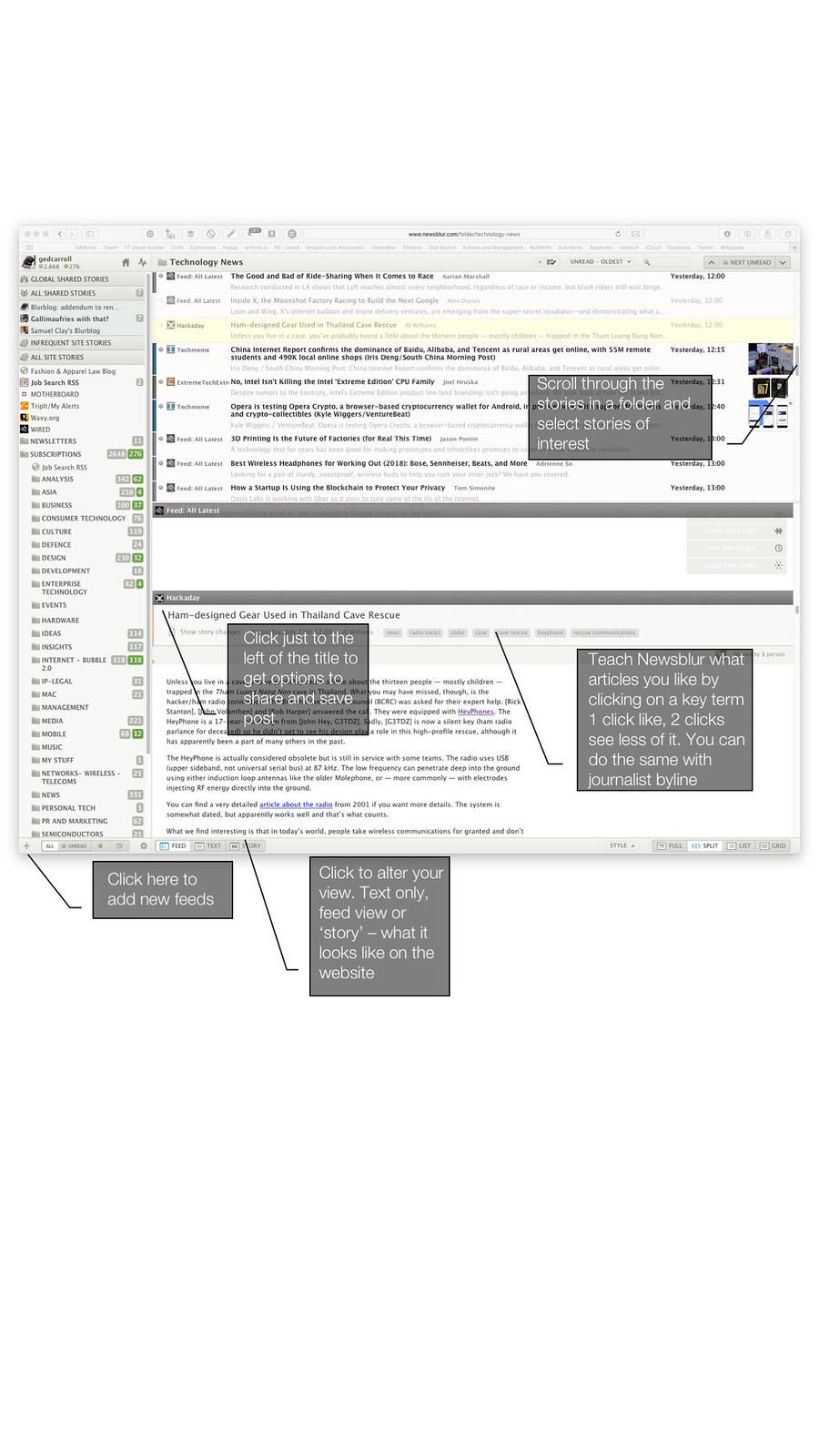
    • You can train the reader to highlight or hide posts that aren’t of interest
    • It provides three views: text-only (great for speed), feed and the article as it appears on the web page ‘in-situ’
    • It offers seamless integration with the pinboard social bookmarking service

    Navigating your way around Newsblur

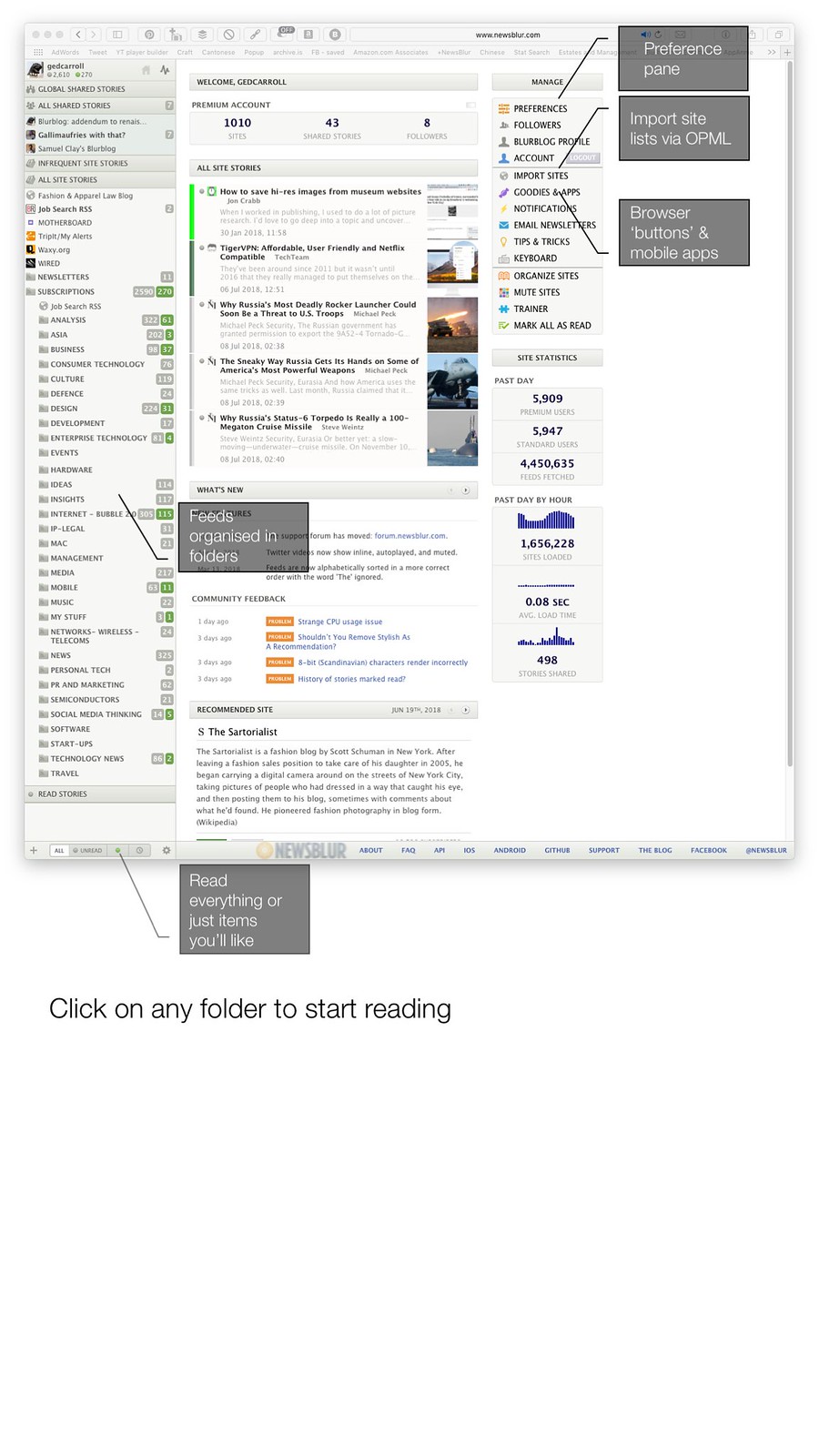
    This is what the home screen looks like

    Newsblur in use

    What is an OPML file? If you’ve already used an RSS reader, an OPML file is a standard export file format that allows you to move from one RSS reader to another. The Goodies and Apps option gives you a bookmarklet that you can add to your browser to add new sites that you want to follow and links to apps for Mac and mobile platforms. On the desktop, using the web interface is best. On mobiles the app is pretty much obligatory to use.

    Click into a folder and start reading

    Newsblur home page

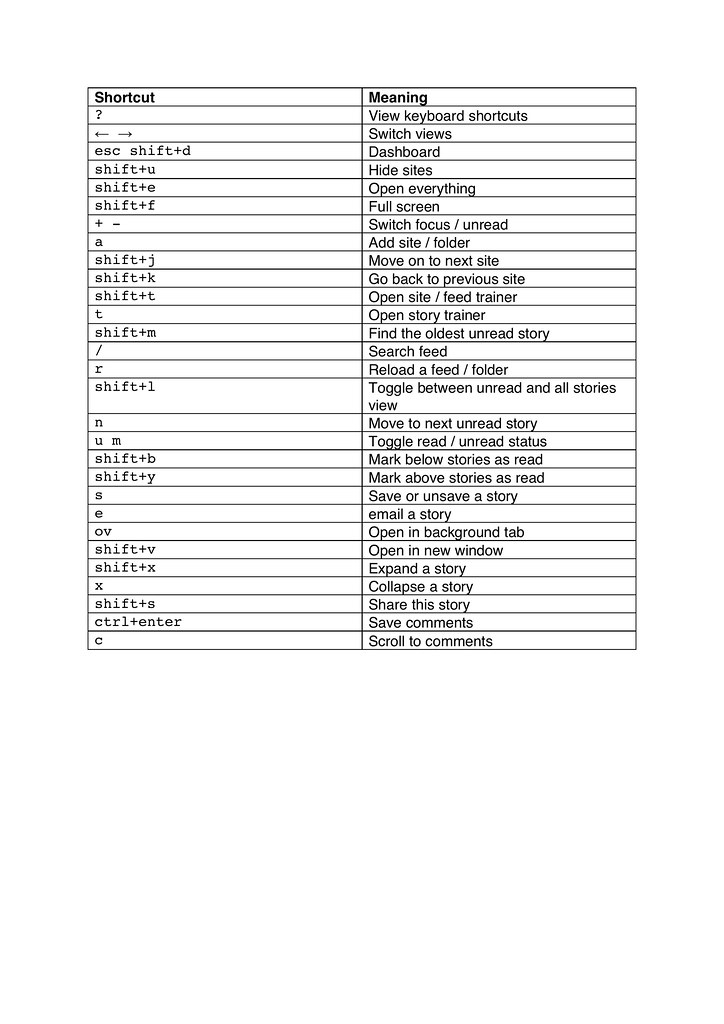
    Keyboard shortcuts cheat sheet
    Newsblur shortcuts

  • Ads into testing + more things

    Why we should relish putting ads into testing – VCCP – bit of an odd concept. The TV ads that I’ve worked on have all gone into testing at concept stage. Ads put into testing have their concepts polished using research from Kantar to maximise effectiveness. I couldn’t understand not putting ads into testing of some sort. More related content here.

    Death of corporate media relations | WSJ – brands don’t trust or need media according to one editor. With their own social media accounts, blogs and websites, they go directly to their audience

    For China, Tech Giant Tencent Is Both a National Champion and a Threat – WSJ  – Tencent, which has more than 45,000 employees, recently began moving into a new $600 million Shenzhen headquarters, a futuristic complex with skywalks linking twin skyscrapers.

    The architects had a bold plan for the executive suite. They wanted to station Mr. Ma and his top lieutenants in a central command post with high visibility, like the bridge on a battleship.

    That wouldn’t do, architects were told. One reason: Too many government officials come calling, and their visits need to be discreet. The executive offices were placed instead in the upper reaches of the highest tower.

    Is timeless UI design a thing? | Imaginary Cloud – wait a minute this is an article about whether good design should be a fad or timeless??? WTF

    Inside China’s Dystopian Dreams: A.I., Shame and Lots of Cameras – The New York Times – “Reform and opening has already failed, but no one dares to say it,” said Chinese historian Zhang Lifan, citing China’s four-decade post-Mao policy. “The current system has created severe social and economic segregation. So now the rulers use the taxpayers’ money to monitor the taxpayers.”

    Google Cloud changes abuse prevention process after viral customer complaint – Business Insider – Google appears a lot more vulnerable. In the many discussions about this incident on Reddit and other online message boards, a big complaint that has surfaced is an inability of Google Cloud customers to contact human customer-service reps in emergencies – not ready for enterprise use

    Japan Tests Silicon for Exascale Computing in 2021 – IEEE Spectrum – wow surprised that ARM is better than SPARC for this?

    bellingcat – After Strava, Polar is Revealing the Homes of Soldiers and Spies – bellingcat – it has been patched now, but worthwhile reading through to understand the journalist’s methodology

    How fast-food restaurants are designed – Curbed

    Millennials Favor Netflix, OTT, Not Demo-Targeted Services 07/06/2018 – interest and passion point segmentation rather than generational

    Music’s ‘Moneyball’ moment: why data is the new talent scout – all of this can get gamed thru payola very easily. It recognises popularity rather than talent and begs the question, why would you go with a record label if you were already ‘making it’ nowadays?

    The Cultural Context of Chinese Fan Culture: An Interview with Xiqing Zheng (Part One) — Henry Jenkins – great read on Chinese fan culture that is used to explore transgressive scenarios

    Memory Loss: Prices Weaken for Chips Used in Smartphones, Self-Driving Cars – WSJ – cyclical memory chip price fluctuations

    Yes, Make Psychedelics Legally Available, but Don’t Forget the Risks – Scientific American Blog Network – interesting that this is on a blog of Scientific American magazine. It feels like the next step along from the medicinal cannabis movement that seems to have gotten a lot of traction

    Demo One disc that came with the early PlayStation’s had an application called V-CD that played music CDs and had a great visualiser to go along with the music. As I am not a gamer, this is why I miss the original PlayStation so much.

    Negativland Interviews U2’s The Edge :Negativworldwidewebland – for many people the hypocrisy that is U2 didn’t manifest itself until some time in the noughties. Negativland’s dispute with them back in 1991 was one of the reasons why Mondo 2000 had them interview The Edge a year later and showing him up. I bet the publicist got fired for this

    German Police Accused of Carrying Out Some Pretty Stupid Raids – or smart overreaching raids….

    Tencent’s WeChat is now host to 1 million mini-programs | SCMP – no data on mini app usage, but this has to be hurting the Android eco-system in particular

  • Quantum computing & other things this week

    Quantum computing explained for different skill levels. The explanations of quantum computing are amazing. The simplicity of the quantum computing explanations should be must watch content.

    A video on Sony‘s old school copy protection for the original PlayStation. It is the height of ingenuity. I had a couple of CDs with black faces like a PlayStation disc. They were a Sisters of Mercy Japanese import disc and a limited edition disc by Yello that I picked up secondhand. I have got no idea where they are now.

    The black coating was a ruse from a copy protection point of view; except that it may have concealed the real copy protection system (if you had a microscope good enough to see it). The technology is down to the way wavy data lines were put down on the PlayStation disks rather than a copy management style encryption.

    An amazing video of Hong Kong’s tram system. Get Lost in Hong Kong on a 3-Minute Trolley Adventure

    My friend Stephen is travelling at the moment and passed through Bozeman, Montana. I tried to explain who Mystery Ranch and Dana Gleason was, and how they came to make the best backpacks in the world. But in the end, I sent this link to him as it explains it all so much better: Interview with Mystery Ranch Founder Dana Gleason – Dana Design Founder Returns to Outdoor Industry | The Field

    Sailor Moon’s Moonlight Densetsu as played on traditional Japanese instruments | Sora News 24 – and yes it is as good as it sounds. The mix of modern and older Japanese culture is fascinating.

  • My Web Toolbox

    Hong Kong Go Bag - Timbuk2

    Over time I’ve built up a web toolbox that help with my workflow. This is many of the ones which have bailed me out of trouble time and time again.

    Communication

    Slack – yes i know that it seems like hipster CB radio. But its popular and you are likely to need to get with the programme. I am a great believer in only accessing Slack only via the desktop interface, by booting the app up once an hour. Part of the reason for this is because it can be a time suck; in the way that email was when it came into offices back in the 1990s. A second reason is Slack keyboard short cuts make life so much easier.

    Content

    Facebook Cheatsheet: Image Sizes and Dimensions 2018 – hypebot – the most up to date guide that I have for Facebook image formats. Really handy for briefing artworkers.

    Hemingway – I have paid good money for the native app, but Hemingway’s web interface is a great gateway drug to improve your writing. I have friends who would recommend the fuller featured Grammarly. Try them both and see what works best for you. In the UK a key consideration is that you can’t always get online; which is is why went with the Hemingway native app.

    Development

    Balsamiq – great rapid wire framing tool that I find easier than Adobe’s offerings. Also worthwhile looking at OmniGraffle – I’ve used the Mac version for years.

    BuildWith – this has saved me hours of work over the years. A client wan’t extra functionality on their website. You need to know what they use to understand if you even want to pitch for it, or if you have to scramble to find a Sitecore developer to partner with.

    Influencers

    Takumi – make the briefing process of Istagrammers a bit easier with Takumi; when you are dealing with them en masse with this specialised outsourcing service

    Digging out influencers in a given area for influencer mapping and influencer marketing programmes is a time intensive process to validate and sieve candidates. Traackr is a good tool to start this process with. They also have workflow tools in there which may be of use depending on what else you use.

    Networking

    network Utility
    Once upon a time there there used to be a great all in one tool called Sam Spade. It was a Windows app and a web app. The Windows app hasn’t been maintained and the web app has gone.  Central Ops does at least some of the things that Sam Spade used to do. If you’re a Mac user who has dug around at all in your machine you will know that there is also a handy little app called Network Utility.  Central Ops provides you with a way to validate and trouble shoot email addresses and see if a domain is available for registration.

    Research

    Google – Yeah I know. Not exactly surprising; but I have a couple of articles on how to get the most out of the privacy-violating search engine: Grokking Google and II.

    Pinboard – When you discover things, it is often hard to re-find them again with your search engine of choice.Algorithmic changes, personalisation of search results and an ever growing web can all work against you. Pinboard keeps the links that you find within easy reach. It allows you to notate the links and categorise them with tags. I use the Pinner app on my iPhone to access my Pinboard account on the go. It’s a lighter weight service than Evernote or Mendeley. If you are already an assiduous user of those services instead, keep going with them. The key thing is develop a habit that will facilitate smarter research. If you use Pinboard in association with a web page capture service like archive today and you can protect yourself if the page changes.

    Standard Deviation Calculator  – This just makes life so much easier. Take a string of numbers, drop them in and get the appropriate values out. This makes data analysis so much easier.

    Wolfram Alpha – handy search engine with a lot of verified data. You can get tips on how to get the most out of it here.

    Search marketing

    Ahrefs – paid for service that’s really good at understanding your competitors SEO mojo including a back link checker and pretty comprehensive competitor research tools.

    Rich Results Test – Google Search Console – see if a site takes advantage of Google’s rich results functionality (particularly handy when you are trying to highlight key information on a website). More on the how and why of them on Econsultancy.

    Sitebeam – an all-in-one tool that provides comprehensive technical SEO audits on websites. It even outputs the results as a PDF. This makes life so much easier.